Postgres: The First Experience
Postgres: The First Experience
Pavel Luzanov, Egor Rogov & Igor Levshin
11th edition · PostgreSQL 17
Start reading · Print the whole book · Original PDF · Corrections and reading notes
Contents
Figures
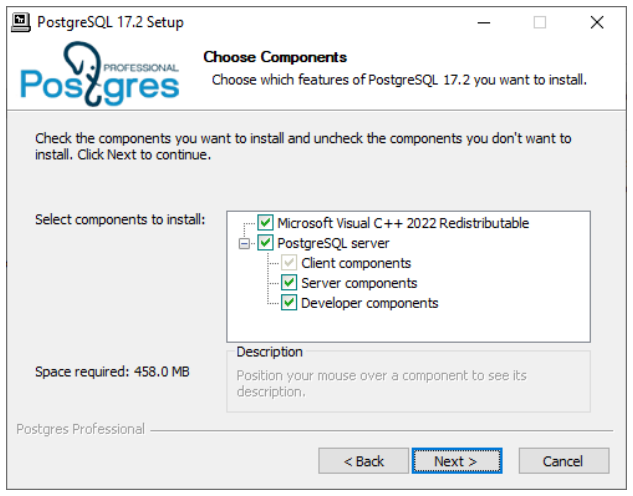
- Figure 3.1 — Selecting installation components
- Figure 3.2 — Choosing the data directory
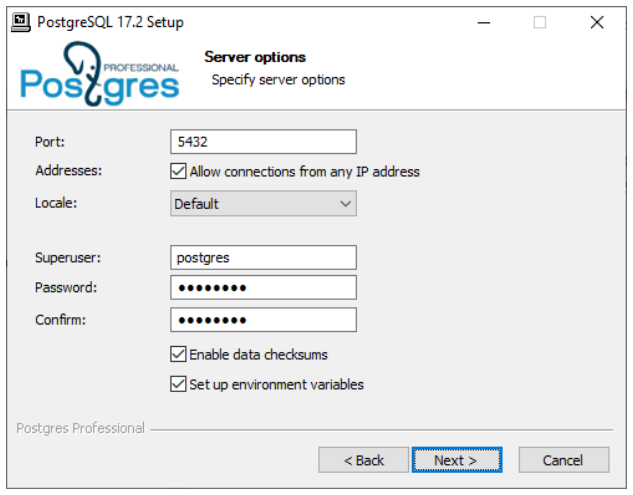
- Figure 3.3 — Setting server connection options
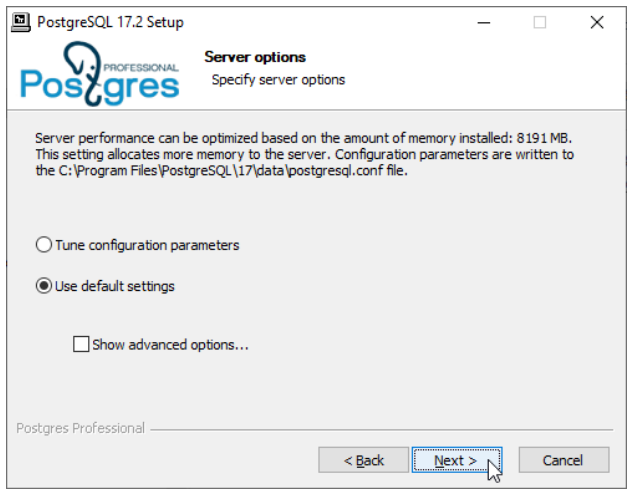
- Figure 3.4 — Choosing server configuration defaults
- Figure 4.1 — Launching SQL Shell from the Start menu
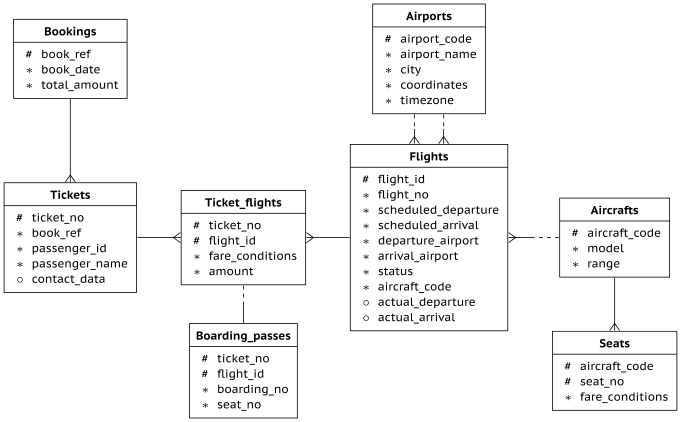
- Figure 5.1 — Bookings database relationships
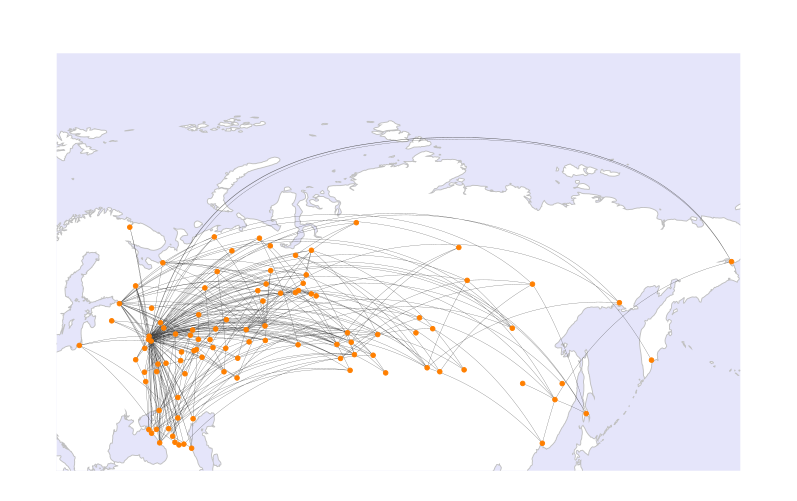
- Figure 5.2 — Airports and routes in the demo database
- Figure 7.1 — Connecting a 1C infobase to PostgreSQL
- Figure 8.1 — Registering a server in pgAdmin
- Figure 8.2 — Browsing database objects in pgAdmin
- Figure 8.3 — Running a query in pgAdmin
- Figure 10.1 — Administration course pathways
- Figure 10.2 — Development course pathways
- Figure 10.3 — Postgres Pro Enterprise course prerequisites
- Figure 10.4 — PostgreSQL. SQL Basics — book cover
- Figure 10.5 — Evgeny Morgunov
- Figure 10.6 — Database Technology Fundamentals — book cover
- Figure 10.7 — Boris Novikov
- Figure 10.8 — PostgreSQL 14 Internals — book cover
- Figure 10.9 — Egor Rogov
- Figure 10.10 — PostgreSQL Monitoring — book cover
- Figure 10.11 — Alexey Lesovsky
- Figure 10.12 — A Database Guide — book cover
- Figure 10.13 — Vladimir Komarov
About this edition
© Postgres Professional, 2016–2025. The English text and illustrations are reproduced from the 11th edition · PostgreSQL 17 PDF. This web edition keeps the original chapter order, examples, and version-specific behavior. Original page references link to their corresponding locations in the chapters.
Publisher and original editions · Publication and credits
Corrections and reading notes
These notes were added by the web edition after checking the supplied PDF against the PostgreSQL 17 documentation. The chapter text and examples retain the original wording. Chapter summaries and descriptive figure captions are also additions to aid navigation. Page numbers below refer to the printed book; the PDF page number is one higher.
Replication slot status — p. 18
In Logical replication, conflicting and invalidation_reason belong to pg_replication_slots. The source names pg_stat_replication in error. See the PostgreSQL 17 view definition.
Direct TLS — p. 20
In Access control, use sslnegotiation=direct together with sslmode=require, verify-ca, or verify-full. The source’s requiredirect is not a valid value. See the libpq connection parameters.
Grouping keys — p. 20
In Query planning and execution, the planner reorders GROUP BY keys, rather than tables, to use an available ordering. See enable_group_by_reordering.
Parallel functions — p. 20
The same section needs a qualification: a function using a subtransaction for error recovery may be explicitly marked PARALLEL SAFE when all its operations meet the safety requirements. Functions remain PARALLEL UNSAFE by default; an EXCEPTION block does not automatically make them safe. See CREATE FUNCTION.
Synchronization option — p. 23
In Miscellaneous, the utility option is --sync-method. The source spells it --synch-method. See the PostgreSQL 17 release notes.
Combined I/O size — p. 23
In that section, an io_combine_limit value written without a unit is measured in database blocks, normally 8 kB each. It is not a raw byte count. The default is 128 kB. See io_combine_limit.
Logical replication during upgrades — p. 17
The upgrade description applies when the old cluster is PostgreSQL 17 or later. It does not promise preservation of logical slots and subscriptions when upgrading a pre-17 cluster to 17. See the PostgreSQL 17 release notes.
Debian and Ubuntu installation — p. 30
The repository command needs a space: $(lsb_release -cs). The PDF prints $(lsb_release-cs), which attempts to run a different command. The distribution list and apt-key workflow also reflect the original edition. For a new installation, follow the PostgreSQL project’s current Debian or Ubuntu instructions and select PostgreSQL 17 to match this book.
SELECT documentation link — p. 53
The original link at the end of Grouping returned HTTP 404 during this review. The displayed address preserves the source wording; its link now opens the PostgreSQL 17 GROUP BY reference. The original destination is recorded in the source manifest.
Introduction
We have written this small book for those who only start getting acquainted with the world of PostgreSQL. From this book, you will learn:
I. PostgreSQL — what is it all about? — p. 3
II. What’s new in PostgreSQL 17 — p. 15
III. Installation on Linux and Windows — p. 25
IV. Connecting to a server, writing SQL queries, and using transactions — p. 35
V. Learning the SQL language on a demo database — p. 61
VI. Using PostgreSQL with your application — p. 89
VII. Minimal server setup — p. 103
VIII. About a useful pgAdmin application — p. 111
IX. Advanced features:
X. Education and certification opportunities — p. 149
XI. Keeping up with all updates — p. 177
XII. About the Postgres Professional company — p. 181
We hope that our book will make your first experience with PostgreSQL more pleasant and help you blend into the PostgreSQL community. Good luck!
1 About PostgreSQL
PostgreSQL is the most feature-rich free and open-source database system. Originally developed in an academic environment, it has successfully united a large community of developers over the years. Nowadays, PostgreSQL offers everything that most customers need, and it is actively used all over the world to create high-load business-critical systems.
Some History
Modern PostgreSQL originates from the POSTGRES project, which was led by Michael Stonebraker, professor of the University of California, Berkeley. Before this work, Michael Stonebraker managed the development of INGRES, one of the first relational database systems. POSTGRES emerged as an effort to rethink previous work and address the limitations of INGRES’s rigid type system.
The project was started in 1985, and by 1988 a number of scientific articles had been published that described the data model, POSTQUEL query language (SQL was not an accepted standard at the time), and data storage structure.
POSTGRES is sometimes considered to be a so-called post-relational database system. The relational model had long been criticized for its restrictions, which were an inevitable trade-off for its strictness and simplicity As computer technologies were spreading in all spheres of life, new types of applications started to appear, and databases had to support custom data types and such features as inheritance or creating and managing complex objects.
The first version of this database system appeared in 1989. It was being improved and enhanced for several years, but in 1993, when version 4.2 was released, the project was shut down. However, despite its official cancellation, UC Berkeley alumni Andrew Yu and Jolly Chen revived the project and resumed its development in 1994, taking advantage of its liberal BSD license and open source. They replaced POSTQUEL query language with SQL, which had become a generally accepted standard by that time. The project was renamed to Postgres95.
In 1996, it became obvious that the Postgres95 name would not stand the test of time, and a new name was selected: PostgreSQL. This name reflects the connection both with the original POSTGRES project and the SQL adoption. This name may be quite hard to articulate, but nevertheless, we should pronounce it as “Post-Gres-Q-L” or simply “postgres,” but not as “postgre.”
The first PostgreSQL release had version 6.0, keeping the original numbering scheme. The project grew, and its management was taken over by at first a small group of active users and developers, which was named PostgreSQL Global Development Group.
Development
All the main decisions about developing and releasing new PostgreSQL versions are taken by the Core team, which consists of seven people at the moment.
Apart from occasional contributors, there is a core group of developers who make significant contributions to PostgreSQL. They are called major contributors. There is also a group of committers, who have the write access to the source code repository. The group’s membership evolves over time, with new developers joining the community while others move on. The current list of developers is published on PostgreSQL’s official website: postgresql.org/community/contributors.
The contribution of Russian developers into PostgreSQL is compelling. This is arguably the largest global open-source project with such a vast Russian representation.
Vadim Mikheev, a software programmer from Krasnoyarsk who used to be a member of the Core team, played an important role in PostgreSQL evolution and development. He created such key core features as multi-version concurrency control (MVCC), vacuum, write-ahead log (WAL), subqueries, triggers. Vadim is not involved with the project anymore.
In 2015, Oleg Bartunov, a professional astronomer and research scientist at Sternberg Astronomical Institute of Lomonosov Moscow State University, teamed up with Teodor Sigaev and Alexander Korotkov to start the Postgres Professional company, which is now the main talent foundry in Russia when it comes to database system development.
The main areas of their contribution are PostgreSQL localization (national encodings and Unicode support), full-text search, working with arrays and semi-structured data (hstore, json, jsonb), new index methods (GiST, SP-GiST, GIN and RUM, Bloom). They have also created a lot of popular extensions.
The PostgreSQL release cycle usually takes about a year. In this timeframe, the community receives patches with bug fixes, updates, and new features from contributors worldwide. Traditionally, all patches are discussed in the pgsql-hackers mailing list. If the community finds the idea useful, its implementation is correct, and the code passes a mandatory code review by other developers, the patch is included into the next release.
At some point (usually in spring, about half a year before the release), code stabilization is announced: all new features get postponed until the next version, only bug fixes and improvements for the already included patches are accepted. Within the release cycle, beta versions appear. Closer to the end of the release cycle a release candidate is built, and soon a new major version of PostgreSQL is released.
Major versions used to be defined by two numbers, but in 2017 it was decided to start using a single number. Thus, version 9.6 was followed by PostgreSQL 10, while the latest available version is PostgreSQL 17, which was released in September 2024.
As the new version is being prepared, developers can find and fix bugs in it. The most critical fixes are backported to the previous versions. The community usually releases updates quarterly; these minor versions accumulate such fixes. For example, version 12.5 contains bug fixes for the 12.4 release, while version 17.1 provides fixes for PostgreSQL 17.0.
Support
PostgreSQL Global Development Group supports major releases for five years. Both support and development are managed through mailing lists. A properly filed bug report has a high likelihood of being addressed quickly; bug fixes can be released in as little as 24 hours.
Aside from the community support, 24x7 commercial support for PostgreSQL is also provided by a number of companies in different countries, including Postgres Professional (www.postgrespro.com).
Current State
PostgreSQL is one of the most popular databases. Based on the solid foundation of academic development, over several decades PostgreSQL has evolved into an enterprise-level product that is now a real alternative to commercial databases. You can see it for yourself by looking at the key features of PostgreSQL 17, which is the latest released version right now.
Reliability and Stability
Reliability is especially important in enterprise-level applications that handle business-critical data. For this purpose, PostgreSQL provides support for hot standby servers, point-in-time recovery, different types of replication (synchronous, asynchronous, cascade).
Security
PostgreSQL supports secure SSL connections and provides various authentication methods, such as password authentication (including SCRAM), client certificates, and external authentication services (LDAP, RADIUS, PAM, Kerberos).
For user management and database access control, the following features are provided:
creating and managing new users and group roles
role- and group-based access control to database objects
row-level and column-level security
SELinux support via a built-in SE-PostgreSQL functionality (Mandatory Access Control)
Russian Federal Service for Technical and Export Control has certified a custom PostgreSQL version released by Postgres Professional for use in data processing systems for personal data and classified information.
Conformance to the SQL Standard
As the ANSI SQL standard is evolving, its support is constantly being added to PostgreSQL. This is true for all versions of the standard, from SQL-92 to the most recent SQL:2023. For example, PostgreSQL 17 fully supports all JSON operations as described in the SQL:2016 Standard.
In general, PostgreSQL provides a high rate of conformance to the SQL standard, supporting 170 out of 177 mandatory features and many optional ones.
Transaction Support
PostgreSQL provides full support for ACID properties and efficient transaction isolation based on the multi-version concurrency control (MVCC). This method avoids locking in all cases except for concurrent updates to the same row by different processes. Reading transactions never block writing ones, and writing never blocks reading.
This is true even for the serializable isolation level, which is the strictest one. Using an innovative Serializable Snapshot Isolation system, this level ensures that there are no serialization anomalies and guarantees that concurrent transaction execution produces the same result as sequential one.
For Application Developers
Application developers get a rich toolset for creating applications of any type:
Support for various server programming languages: built-in PL/pgSQL (which is closely integrated with SQL), C for performance-critical tasks, Perl, Python, Tcl, as well as JavaScript, Java, etc.
APIs to access the database from applications written in virtually any language, including the standard ODBC and JDBC APIs.
A rich set of database objects that allow you to efficiently implement the logic of any complexity on the server side: tables and indexes, sequences, integrity constraints, views and materialized views, partitioning, subqueries and WITH-queries (including recursive ones), aggregate and window functions, stored functions, triggers, etc.
A flexible full-text search system that supports a variety of languages, extended with efficient index access methods.
Semi-structured data typical of NoSQL: hstore (storage of key–value pairs), xml, json (represented as text or in a more robust jsonb binary format).
Foreign Data Wrappers. This feature allows adding new data sources as external tables by the SQL/MED standard. You can use any major database as an external data source. PostgreSQL provides full support for foreign data, including write access and distributed query execution.
Scalability and Performance
PostgreSQL takes advantage of the modern multi-core CPU architecture. Its performance grows almost linearly as the number of cores increases.
PostgreSQL can parallelize queries and some commands (such as index creation and vacuuming). In this mode, reads and joins are performed by several concurrent processes. JIT-compilation of queries can speed up operations thanks to better use of hardware resources. Each PostgreSQL version adds new parallelization features.
Horizontal scaling can rely on both physical and logical replication. It allows you to build PostgreSQL-based clusters to achieve high performance, fault tolerance, and geodistribution. Some examples of such systems are Citus (Citusdata), Postgres-BDR (2ndQuadrant), Multimaster and BiHA (Postgres Professional), Patroni (Zalando).
Query Planner
PostgreSQL relies on a cost-based query planner. Using the collected statistics and taking into account both disk operations and CPU time in its mathematical models, the planner can optimize even the most complex queries. It can use all access paths and join methods available in state-of-the-art commercial database systems.
Indexing
PostgreSQL provides various types of indexes. Apart from traditional B-trees, you can use many other access methods.
Hash, a hash-based index. Unlike B-trees, such indexes work only for equality checks, but in some cases they can prove to be more efficient and compact.
GiST, a generalized balanced search tree. This access method is used for the data that cannot be ordered. For example, R-trees index points on a plane and facilitate fast k-nearest neighbor (k-NN) searches or indexing overlapping intervals.
SP-GiST, a generalized non-balanced tree based on dividing the search space into non-intersecting nested partitions. For example, quad-trees for spatial data and radix trees for text strings.
GIN, a generalized inverted index used for compound multi-element values. It is mainly applied in full-text search to find documents that contain the words used in the search query. Another example is search for elements in data arrays.
RUM, an enhancement of the GIN method for full-text search. Available as an extension, this index type can speed up phrase search and return the results in the order of relevance without any additional computations.
BRIN, a compact structure that provides a trade-off between the index size and search efficiency. Such index is useful for huge clustered tables.
Bloom, an index based on the Bloom filter. Having a compact representation, this index can quickly filter out non-matching tuples, but the remaining ones have to be re-checked.
Many index types can be built upon both a single column and multiple columns. Regardless of the type, you can build indexes not only on columns, but also on arbitrary expressions. It is also possible to create partial indexes for specific sets of rows. Covering indexes can speed up queries, since all the required data is retrieved from the index itself, avoiding heap access.
The planner can use a bitmap scan, which allows combining several indexes together for faster access.
Cross-Platform Support
PostgreSQL runs both on Unix operating systems (including server and client Linux distributions, FreeBSD, Solaris, and macOS) and on Windows systems.
Its portable open-source C code allows building PostgreSQL on a variety of platforms, even if there is no package supported by the community.
Extensibility
One of the main advantages of PostgreSQL architecture is extensibility. Without changing the core system code, users can add various features, such as:
data types
functions and operators to support new data types
index and table access methods
server programming languages
foreign data wrappers
loadable extensions
Comprehensive extension support allows for the development of new features of any complexity, which can be installed on demand without modifying the PostgreSQL core. For example, the following complex systems are built as extensions:
CitusDB, which implements massively parallel query execution and data distribution between different PostgreSQL instances (sharding).
PostGIS, one of the most popular and powerful geoinformation data processing systems.
- TimescaleDB, which provides support for time-series data, including special partitioning and sharding.
The standard PostgreSQL 17 distribution alone includes about fifty extensions that have proved to be useful and reliable.
Availability
A liberal PostgreSQL license, which is similar to BSD and MIT licenses, allows unrestricted use of PostgreSQL; you may also modify PostgreSQL code without any limitations and integrate it into other products, including commercial and closed-source software.
Independence
PostgreSQL does not belong to any company; it is developed by the international community, which includes developers from all over the world. It means that systems using PostgreSQL do not depend on a particular vendor, thus keeping the investment safe in any circumstances.
2 What's New in PostgreSQL 17
Web edition note. This chapter contains several source errors and version qualifications. Read the corrections for PostgreSQL 17 alongside the original text below.
If you are familiar with the previous versions of PostgreSQL, this chapter can give you a sense of what has changed over the past year. It mentions only some of the updates; for the full list of changes, see the Release Notes: postgrespro.com/docs/postgresql/17/release-17. You can also follow our blog to keep up with the news: https://habr.com/en/companies/postgrespro/articles/.
SQL Commands
Improved MERGE command. The new WHEN NOT MATCHED BY SOURCE clause now lets you work with rows from the target relation which are not in the source, the RETURNING clause is now supported, and you can use views as targets same way you did with tables.
The COPY FROM command can now be forced to ignore errors caused by invalid value formats in some columns, courtesy of the new parameter on_error. And the parameter log_verbosity will display the skipped values as NOTICE-level messages. A future enhancement may allow pushing invalid values into a separate table.
You can now alter generated table expressions using the command ALTER COLUMN with the SET EXPRESSION clause. Previously, the only option was to remove it.
The abbreviation AT LOCAL for the current time zone can now be used instead of AT TIME ZONE with a time zone value, as defined in the SQL standard.
Functions and types
The overloaded function random now accepts two parameters to define the minimum and maximum values for the random number. Supports int, bigint and numeric values.
The type interval now supports infinite values.
In addition to to_hex for hexadecimal, similar functions are added for binary (to_bin) and octal (to_oct) systems.
New format masks for the to_timestamp function: TZ (for Time Zone) and OF (Offset from UTC). Previously, you had to use to_char.
The function xmltext, as defined in the SQL Standard, converts the input string to XML, properly escaping special characters.
New Unicode functions: unicode_assigned checks if every character in a string has a valid Unicode value, unicode_version returns the Unicode version for PostgreSQL, and icu_unicode_version returns the ICU version.
Parameter names have been assigned to some aggregate function definitions with more than one parameter.
SQL/JSON
The glorious epic that is implementation of the 2016 SQL/JSON Standard has now concluded. The missing functions JSON_EXISTS, JSON_QUERY, JSON_VALUE and JSON_TABLE are finally in, and the jsonpath language gets new methods for data conversion into bigint, boolean, date, decimal, integer, number, string, time_tz, time, timestamp_tz and timestamp.
Logical replication
Upgrading is much easier now. The pg_upgrade tool migrates replication slots to the publisher, so subscribers just have to update the connection string. And when upgrading the subscriber, all subscriptions stay intact and replication continues without the need to resynchronize.
A logical replica can use a physical one as a base: it already has all the tables synchronized, so setting up the replication will not take long. The new tool pg_createsubscriber switches the physical replica into read-write mode, creates the publisher and subscriber pairs in one or several databases on both servers, and specifies the position to continue replicating from in the subscriptions’ properties.
Logical slots are migrated to replicas and kept up to date. After switchover, all you have to do is update the connection string to point to the new server, and the replication resumes.
You can check what replication workers are doing in the pg_stat_subscription view’s new column worker_type.
Possible values are: apply, parallel apply, and table synchronization.
The columns conflicting and invalidation_reason in the pg_stat_replication view show if and why the logical replication slot became invalid.
In addition to that, logical decoding and, consequently, logical replication have been significantly optimized for cases with large numbers of subtransactions.
Vacuum
Vacuum is now much less memory-intensive thanks to the new dead tuples storage utilizing radix trees. Additionally, tuple ID lookup is faster, memory is allocated dynamically (used to be all maintenance_work_mem at once), and the 1 GB hard cap is no more. Now, most tables will be vacuumed in one pass, avoiding repeat index scans.
Vacuum monitoring has improved. There are two new columns in pg_stat_progress_vacuum: total number of indexes to be vacuumed (indexes_total) and the number of indexes already vacuumed (indexes_processed).
WAL size is now smaller in cases where rows are frozen during vacuuming. Both events are treated as one record in WAL.
Backup and upgrade
Incremental backup on the page level has been added to PostgreSQL. The process walsummarizer (with the parameter summarize_wal) reads WAL and records which pages are modified. The pg_basebackup tool’s new parameter --incremental enables incremental backup and utilizes the new replication protocol features. pg_combinebackup is the recovery tool that assembles the full backup from the incremental backup and all the backups it depends on.
You can specify the database to connect to as the parameter dbname in pg_basebackup and pg_receivewal. The former (with the -R key) will also add the database name to primary_conninfo when writing to postgresql.auto.conf. Neither tool needs the database name as such, but it is required when connecting over a proxy and when setting up replication slot synchronization on a replica.
New keys for pg_dump: --filter specifies a file with a list of objects to be included into or excluded from the dump. --exclude-extension excludes a list of extensions.
Quicker upgrades with pg_upgrade for databases with multiple large objects and tables. pg_dump now groups the large objects in the backup index, and pg_restore commits changes in transactions of the size specified in --transaction-size. Additionally, for parallel recovery, the leader process logic is improved.
Access control
New privilege MAINTAIN for ANALYZE, VACUUM (including VACUUM FULL), CLUSTER, REINDEX, REFRESH MATERIALIZED VIEW and LOCK TABLE. Membership in pg_maintain grants this privilege for every relation in the database.
Direct connection over TLS is now available for client applications using libpq. Enabled by setting the parameter sslnegotiation to requiredirect.
New default privilege display: psql returns (none) if there are no privileges, and also respects \pset null.
Query planning and execution
Materialized CTE statistics are now available to the planner. This includes CTE column statistics and row sorting order.
The planner can swap tables in GROUP BY, for example, to utilize index or incremental sorting.
Functions with subtransactions are now PARALLEL SAFE. This includes, in particular, PL/pgSQL functions with EXCEPTION blocks. Additionally, the parallel section of the plan can also include InitPlan nodes.
Improvements for the EXPLAIN command:
The parameter
memorydisplays how much memory was used to design the plan.The parameter
serializeshows the cost of conversion of the query result into a text or binary format to be sent to the client (particularly for TOAST assembly).Improved readability of SubPlan and InitPlan nodes.
Many indexing features have always been available for B-trees only. Now, other index types can take advantage of them too:
- Hash indexes allows for identifying altered rows on the logical replication subscriber.
Incremental sorting works with GiST and SP-GiST indexes.
BRIN indexes can be created in parallel.
Some partitioning improvements:
You can now set exclusion constraints.
Full support for
GENERATED AS IDENTITYcolumns.
Monitoring
The new view pg_stat_checkpointer displays checkpointer process statistics, previously available in pg_stat_bgwriter. It also shows replica restart points statistics. Columns buffers_backend and buffers_backend_fsync are gone from pg_stat_bgwriter, since pg_stat_io now shows more accurate data about the processes.
pg_stat_statements view:
New columns tracking full statistics reset times and minimum and maximum time statistics (
stats_sinceandminmax_stats_since).Normalization of commands
CALL,PREPARE TRANSACTION,COMMIT/ROLLBACK PREPAREDandDEALLOCATE: their parameters are replaced with constant values, so the commands will be recorded as a single event.
Range type column statistics are now available in pg_stats.
Extension developers can now define their own wait events. The pioneers are the people behind the dblink and postgres_fdw extensions.
Wait event types and descriptions are available in the new view pg_wait_events as well as in the documentation.
Event triggers
You can finally create an ON LOGIN trigger for database connection events.
Event triggers work for the REINDEX command.
The parameter event_triggers enables or disables event triggers, primarily for debugging purposes.
Configuration parameters
The parameter old_snapshot_threshold, first introduced in PostgreSQL 9.6, is gone, after issues with implementation and efficiency came up.
The new parameter transaction_timeout limits total transaction time. Old statement_timeout and idle_in_transaction_session_timeout parameters did not guarantee that a transaction will complete or terminate within a specific timeframe.
The parameter huge_pages_status shows if any huge pages were allocated if huge_pages = try.
Some new configuration parameters define SLRU cache sizes, allowing for more fine-tuning:
commit_timestamp_buffers— time of commit,multixact_member_buffersandmultixact_offset_buffers— multitransactions,subtransaction_buffers— nested transactions,notify_buffers— asynchronous messages,
transaction_buffers— transaction statuses,serializable_buffers— serializable transaction conflicts.
The ALTER SYSTEM command now can record custom parameters to postgresql.auto.conf. The parameter allow_alter_system can block ALTER SYSTEM from accidentally altering the configuration.
Localization
New stock provider with support for C and C.UTF8 locales.
Miscellaneous
You can use the key --synch-method to set the disc synchronization method for some utilities: initdb, pg_basebackup, pg_checksums, pg_rewind, pg_upgrade and pg_dump. The default method is fsync.
The walsender process reads WAL records from buffers when possible, bypassing the file system.
Previously, PostgreSQL sent a separate system call for each page and hoped that the OS would combine these operations on its end. Now, the multiblock read infrastructure exists: a sequence of pages (up to io_combine_limit bytes at a time) can be retrieved in one pass. Asynchronous reading is to be added in the future, enabling page processing as they come in, without waiting for the operation to complete.
3 Installation and Quick Start
Web edition note. Before running the Debian or Ubuntu repository commands, read the installation correction: the source omits a space in
lsb_release -cs, and repository setup has changed since publication.
What is required to get started with PostgreSQL? In this chapter, we’ll learn how to install PostgreSQL and manage the corresponding service. In the next chapter, we’ll continue by creating a simple database and trying out some basic SQL queries.
We are going to use a regular (often called “vanilla”) distribution of PostgreSQL 17. Depending on your operating system, the process of installing and setting up PostgreSQL will differ:
If you are using Windows, read on.
To set up PostgreSQL on Linux-based Debian or Ubuntu systems, go to p. 30.
For other operating systems, you can view installation instructions online: www.postgresql.org/download.
You can also use Postgres Pro Standard 17: it is fully compatible with vanilla PostgreSQL, includes some additional features developed by Postgres Professional, and is free when used for trial or educational purposes. Check out installation instructions at postgrespro.com/products/download in this case.
Windows
Installation
Download the PostgreSQL installer, launch it, and select the installation language: postgrespro.com/windows.
The installer provides a conventional wizard interface: you can simply keep clicking the “Next” button if you are fine with the default options. Let’s go over the main steps.
Choose components (keep the current selection if you are unsure of what to choose):
Then you have to specify PostgreSQL installation directory. By default, the PostgreSQL server is installed in C:\Program Files\PostgreSQL\17.
You can also specify the location of the data directory.
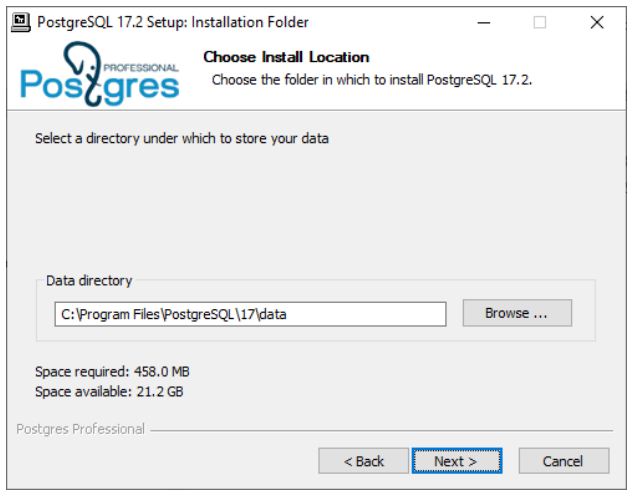
This directory will hold all the information stored in your database system, so make sure you have enough disk space if you plan to keep a lot of data.
If you plan to store data in a non-English language, ensure that you select the corresponding locale (or leave it as “Default” if your Windows locale settings are correct).
Enter and confirm the password for the postgres database user. You should also select the “Set up environment variables” checkbox to connect to the PostgreSQL server as the current OS user.
You can leave the default settings in all the other fields.
If you are planning to install PostgreSQL for training purposes only, you can select the “Use the default settings” option for the database system to take up less RAM.
Managing the Service and the Main Files
When PostgreSQL is installed, the “postgresql-17” service is registered on your system. This service is launched automatically at the system startup under the Network Service account. If required, you can change the service settings using the standard Windows options.
To temporarily stop the service, run the “Stop Server” program from the Start menu subfolder that you have selected at installation time.
To start the service, run the “Start Server” program from the same folder.
If an error occurs when starting the service, you can view the server log to find out its cause. The log file is located in the log subdirectory of the database directory chosen at installation time (you can typically find it at C:\Program Files\PostgreSQL\17\data\log). Logging is regularly switched to a new file. You can find the required file either by the last modified date or by the filename that includes the date and time of the switchover to this file.
There are several important configuration files that define server settings. They are located in the database directory. You do not have to modify them to get started with PostgreSQL, but you’ll definitely need them in real work. Take a look into these files; they are fully documented:
postgresql.conf is the main configuration file that contains server parameters.
pg_hba.conf defines access rules. For security reasons, the default configuration only allows local system access, requiring password authentication.
Now we are ready to connect to the database and try out some commands and SQL queries. Go to the “Trying SQL” chapter on p. 35.
Debian and Ubuntu
Installation
If you are using Linux, you need to add PGDG (PostgreSQL Global Development Group) package repository. At the moment, the supported Debian versions are 10 “Buster,” 11 “Bullseye,” and 12 “Bookworm.” The currently supported Ubuntu versions are 20.04 “Focal,” 22.04 “Jammy,” 23.10 “Mantic” and 24.04 “Noble”.
Run the following commands in the console window:
Once the repository is added, let’s update the list of packages:
Before starting the installation, check localization settings:
If you plan to process non-English data, the LC_CTYPE and LC_COLLATE variables may have to be configured. For example, it makes sense to set these variables to “fr_FR.UTF8” for the French language, even though the “en_US.UTF8” may do too:
You should also make sure that the operating system has the required locale installed:
If this is not the case, generate the locale, as follows:
Now we can start the installation:
It was the final step; once the installation command completes, PostgreSQL will be installed and launched. To check that the server is ready to use, run:
If all went well, the current PostgreSQL version is returned.
Managing the Service and the Main Files
When PostgreSQL is installed, a special postgres user is created on your system. All the server processes work on behalf of this user, and all the database files belong to this user as well. PostgreSQL will be started automatically at the operating system boot. It’s not a problem with the default settings: if you are not working with the database server, it consumes very little of system resources. If you decide to disable automatic startup, run:
To temporarily stop the database server service, enter:
You can launch the server service as follows:
You can also check the current state of the service:
If the service fails to start, check the server log for details. Take a closer look at the latest log entries in /var/log/postgresql/postgresql-17-main.log.
All information stored in the database is located in the /var/lib/postgresql/17/main/ directory. If you are going to keep a lot of data, make sure that you have enough disk space.
Server settings are defined by several configuration files. There’s no need to edit all these files to get started, but it’s worth checking them out since you’ll definitely need them in the future:
/etc/postgresql/17/main/postgresql.conf is the main configuration file that contains server parameters.
/etc/postgresql/17/main/pg_hba.conf file defines access settings. For security reasons, the default configuration only allows access from the local system on behalf of the database user that has the same name as the current OS user.
Now it’s time to connect to the database and try out SQL.
4 Trying SQL
Connecting via psql
To connect to the database server and start executing commands, you need to have a client application. In the “PostgreSQL for Applications” chapter, we will talk about sending queries from applications written in different programming languages. And here we’ll explain how to work with the psql client from the command line in interactive mode.
Unfortunately, many people are not very fond of the command line nowadays. Yet it is really worth mastering.
First of all, psql is a standard client application included in all PostgreSQL packages, so it’s always available. Having a customized environment is beneficial, but there is no need to get lost on an unfamiliar system.
Secondly, psql is really convenient for everyday DBA tasks, writing small queries, and automating processes. For example, you can use it to periodically deploy application code updates on your database server. The psql client provides its own commands that can help you find your way around database objects and display the data stored in tables in a convenient format.
However, if you are used to working in graphical user interfaces, try pgAdmin (we’ll get back to it later) or other similar products: wiki.postgresql.org/wiki/Community_Guide_to_PostgreSQL_GUI_Tools.
To start psql on a Linux system, run this command:
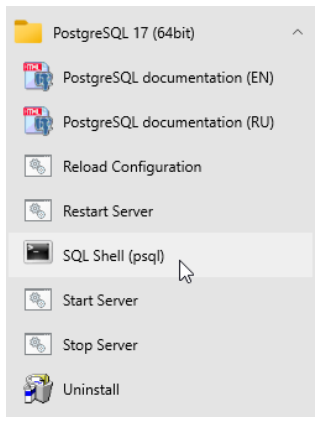
On Windows, open the Start menu and launch the “SQL Shell (psql)” program. When prompted, enter the password for the postgres user that you set when installing PostgreSQL.
Windows users may run into encoding issues when viewing non-Latin characters in the terminal. If that is the case, make sure that a TrueType font is selected in the properties of the terminal window (typically, “Lucida Console” or “Consolas”).
As a result, you should see the same prompt on both operating systems: postgres=#. Here “postgres” is the name of the database to which you are connected right now. A single PostgreSQL server can serve several databases, but you can work only with one of them at a time.
Now let’s try out some commands. Enter only the part printed in bold; the prompt and the system response are provided here solely for your convenience.
Databases
Let’s create a new database called test:
Don’t forget to finish each command with a semicolon: PostgreSQL expects you to continue typing until you enter this symbol (so you can split the command between multiple lines).
Now let’s connect to the created database:
As you can see, the command prompt has changed to test=#.
The command that we’ve just entered does not look like SQL, as it starts with a backslash. This is a convention for special commands that can only be run in psql. If you are using pgAdmin or another GUI tool, skip all commands starting with a backslash or find an equivalent.
There are quite a few psql commands, and we’ll use some of them a bit later. To get the full list of psql commands right now, you can run:
Since the reference information is quite bulky, it will be displayed in a pager program of your operating system, which is usually more or less.
Tables
Relational database management systems present data as tables. The structure of the table is defined by its columns; the data itself is stored in table rows. The data is not ordered, so rows are not necessarily stored in the same order they were added to the table.
For each column, a data type is defined. All the values in the corresponding row fields must belong to this type. You can use multiple built-in data types provided by PostgreSQL (postgrespro.com/doc/datatype) or add your own custom types, but here we’ll cover just a few main ones:
integertextboolean, which is a logical data type takingtrueorfalsevalues
Apart from regular values defined by the data type, a field can be NULL. It can be interpreted as “the value is unknown” or “the value is not set.”
Let’s create a table of university courses:
Note that the psql command prompt has changed: it is a hint that the command continues on the new line. For convenience, we will not repeat the prompt on each line in the examples that follow.
The above command creates the courses table with three columns: c_no specifies the course number represented as a text string, title provides the course title, and hours lists an integer number of lecture hours.
Apart from columns and data types, we can define integrity constraints that will be checked automatically: PostgreSQL will not allow invalid data in the database. In this example, we have added the PRIMARY KEY constraint for the c_no column. It means that all the values in this column must be unique, and NULLs are not allowed. Such a column can be used to distinguish one table row from another. The postgrespro.com/doc/ddl-constraints page lists all the available constraints.
You can find the exact syntax of the CREATE TABLE command in the documentation, or view command-line help right in psql:
Such reference information is available for each SQL command. To get the full list of SQL commands, run \help without arguments.
Filling Tables with Data
Let’s insert some rows into the created table:
If you need to perform a bulk data upload from an external source, the INSERT command is not the best choice. Instead, you can use the COPY command specifically designed for this purpose: postgrespro.com/doc/sql-copy.
We’ll need two more tables for subsequent examples: students and exams.
For each student, we are going to store their name and the year of admission (start year). The student ID number will serve as the student’s identifier.
The exams table contains all the scores received by students in the corresponding course. Thus, students and courses are connected by the many-to-many relationship: each student can take exams in multiple courses, and each exam can be taken by multiple students.
Each table row is uniquely identified by the combination of a student ID and a course number. Such an integrity constraint pertaining to several columns at once is defined by the CONSTRAINT clause:
Besides, the REFERENCES clause here defines two referential integrity checks called foreign keys. Such keys show that the values of one table reference rows of another table.
After any action performed on the database, PostgreSQL checks that all the s_id identifiers in the exams table correspond to real students (that is, entries in the students table), while c_no course numbers correspond to real courses. Thus, it is impossible to assign a score on a non-existing subject or to a non-existent student, regardless of the user actions or possible application errors.
Let’s assign several scores to our students:
Data Retrieval
Simple Queries
To read data from tables, use the SQL operator SELECT. For example, let’s display two columns of the courses table. The AS clause allows you to rename the column if required:
The asterisk * displays all the columns:
In production applications, it is recommended to explicitly specify only those columns that are really needed: then the query is performed more efficiently, and the result does not depend on new columns that may appear. But in interactive queries you can simply use an asterisk.
The result can contain several rows with the same data. Even if all rows in the original table are different, the data can appear duplicated if not all the columns are displayed:
To select all different start years, specify the DISTINCT keyword after SELECT:
For details, see the documentation: postgrespro.com/doc/sql-select#SQL-DISTINCT.
In general, you can use any expressions after the SELECT operator. And if you omit the FROM clause, the query will return a single row. For example:
When you select some data from a table, it is usually required to return only those rows that satisfy a certain condition. This filtering condition is specified in the WHERE clause:
The condition must be of a logical type. For example, it can contain operators =, <> (or !=), >, >=, <, <=, as well as combine simple conditions using logical operations AND, OR, NOT, and parenthesis (like in regular programming languages).
Handling NULLs is a bit more subtle. The result will contain only those rows for which the filtering condition is true; if the condition is false or undefined, the row is excluded.
Remember:
The result of comparing something to
NULLis undefined.The result of logical operations on
NULLs is usually undefined (exceptions:true OR NULL = true,false AND NULL = false).To check whether the value is undefined, the following operators are used:
IS NULL(IS NOT NULL) andIS DISTINCT FROM(IS NOT DISTINCT FROM).
The coalesce expression is often used to replace NULL values with something else, such as an empty string for text types or zero for numeric types.
For more details, see the documentation: postgrespro.com/doc/functions-comparison.
Joins
A well-designed database should not contain redundant data. For example, the exams table must not contain student names, as this information can be found in another table by the number of the student ID card.
For this reason, to get all the required values in a query, it is often necessary to join the data of several tables, specifying their names in the FROM clause:
This result is called the direct or Cartesian product of tables: each row of one table is appended to each row of the other table.
As a rule, you can get a more useful and informative result if you specify the join condition in the WHERE clause. Let’s match the courses to the corresponding exams to get all the scores for all the courses:
Another way to join tables is to explicitly use the JOIN keyword. Let’s display all the students and their scores for the “Networks” course:
From the database point of view, these queries are completely equivalent, so you can use any approach that seems more natural.
In this example, the result does not include any rows of the table specified on the left side of the join clause if they have no pair in the right table: although the condition is applied to the subjects, the students that did not take the exam in this subject are also excluded. To include all the students into the result, we have to use the outer join:
Note that the rows of the left table that don’t have a counterpart in the right table are added to the result (that’s why the operation is called LEFT JOIN). The corresponding values of the right table are NULL in this case.
The WHERE conditions are applied to the result of the join operation. Thus, if you move the subject restriction from the join condition to the WHERE clause, Nina will be excluded from the result because the corresponding exams.c_no is NULL:
Don’t be afraid of joins. It is a common operation for database management systems, and PostgreSQL has a whole range of efficient mechanisms to perform it. Do not join data at the application level; let the database server handle it properly.
For more details, see the documentation: postgrespro.com/doc/sql-select#SQL-FROM.
Subqueries
The SELECT operation returns a table, which can be displayed as the query result (as we have already seen) or used in another SQL query. Such a nested SELECT command in parentheses is called a subquery.
If a subquery returns exactly one row and one column, you can use it as a regular scalar expression:
If a scalar subquery used in the list of SELECT expressions does not contain any rows, NULL is returned (as in the last row of the result in the example above). Thus, you can expand scalar subqueries by replacing them with a join, but it must be an outer join.
Scalar subqueries can also be used in filtering conditions. Let’s display all the exams taken by the students enrolled after 2014:
You can also add filtering conditions to subqueries returning an arbitrary number of rows. SQL offers several predicates for this purpose. For example, IN checks whether the table returned by the subquery contains the specified value.
Let’s display all the students who have any scores in the specified course:
There is also the NOT IN form of this predicate, which returns the opposite result. For example, the following query returns the list of students who did not get any excellent scores:
Note that this query result can also include those students who have not received any scores at all.
Another option is to use the EXISTS predicate, which checks whether the subquery returns at least one row. With this predicate, you can rewrite the previous query as follows:
For more details, see the documentation: postgrespro.com/doc/functions-subquery.
In the examples above, we appended table names to column names to avoid ambiguity, but it is not always sufficient. For example, the same table can be used in the query twice, or the FROM clause can contain a nameless subquery instead of a table name. In such cases, you can specify an arbitrary name after the query, which is called an alias. Regular tables can also be assigned an alias.
Let’s display student names and their scores for the “Databases” course:
Here “s” is a table alias, while “ce” is a subquery alias. You should choose an alias that is short but comprehensive.
The same query can also be written without subqueries:
Sorting
As we already know, table data is not sorted. To return the rows in a particular order, we can use the ORDER BY clause with the list of sorting expressions. After each expression (sorting key), you can specify the sort direction: ASC for ascending (used by default), DESC for descending.
Here the rows are first sorted by the score, in ascending order. For the same scores, the rows are further sorted by the student ID card number, also in ascending order. If the first two keys are the same, rows are additionally sorted by the course number, in descending order.
It makes sense to sort data at the end of the query, right before returning the result; this operation is usually unnecessary in subqueries.
For more details, see the documentation: postgrespro.com/doc/sql-select#SQL-ORDERBY.
Grouping
When grouping is used, the query returns summary data calculated from multiple rows stored in the original tables.
Grouping typically involves aggregate functions. For example, this is how we can display the total number of exams taken, the number of students who passed the exams, and the average score:
You can get similar information by the course number if you provide the GROUP BY clause with grouping keys:
For the full list of aggregate functions, see postgrespro.com/doc/functions-aggregate.
In queries that use grouping, you may need to filter the rows based on the aggregation results. You can define such conditions in the HAVING clause. While the WHERE conditions are applied before grouping (and can use the columns of the original tables), the HAVING conditions take effect after grouping (so they can also use the columns of the resulting table).
Let’s select the names of the students who got more than one excellent score (5), in any course:
For more details, see the documentation: postgrespro.ru/doc/sql-select#SQL-GROUPBY. (Link repaired to the PostgreSQL 17 reference; the printed destination is unavailable.)
Changing and Deleting Data
To modify data in a table, you should use the UPDATE operator, which provides new field values for rows defined by the WHERE clause (similar to the SELECT operator).
For example, let’s double the number of lecture hours for the “Databases” course:
For more details, see the documentation: postgrespro.com/doc/sql-update.
Similarly, the DELETE operator deletes the rows defined by the WHERE clause:
Transactions
Let’s extend our database schema a little bit and distribute our students between groups. Each group must have a monitor (a student of the same group responsible for the students’ activities). For this purpose, let’s create the groups table:
Here we have applied the NOT NULL constraint, which forbids using undefined values.
Now we need another column in the students table: the group number. Luckily, we can add a new column into the already existing table:
Using the psql command, you can always check which columns are defined in the table:
You can also get the list of all the tables available in the database:
Now let’s create a new group called “A-101,” move all the students into this group, and make Anna its monitor.
Note the following subtle point. We cannot create a group without a monitor, but neither can a student become the monitor of the group unless they are already a member of this group—it would make our data logically incorrect and inconsistent. Taken separately, these two operations make no sense: they must be performed simultaneously. A transaction is a group of operations that form an indivisible logical unit of work.
So let’s start our transaction:
Next, we need to add a new group, together with its monitor. Naturally, we cannot remember all the students’ ID, so we’ll use the following query right inside the command that adds new rows:
The asterisk in the prompt reminds us that the transaction is not yet completed.
Now let’s open a new terminal window and launch another psql process: this session will be running in parallel with the first one. To avoid confusion, we will indent the commands of the second session.
Will the second session see the changes made in the first session?
No, since the transaction is not yet completed.
To continue with our transaction, let’s move all students to the newly created group:
The second session still gets consistent data, which was already present in the database when the uncommitted transaction was started.
Let’s commit all our changes to complete the transaction:
Finally, the second session receives all the changes made by this transaction, as if they appeared all at once:
It is guaranteed that several important properties of the database system are always observed.
First of all, any transaction is executed either completely (like in the example above), or not at all. If at least one of the commands results in an error, or we have aborted the transaction with the ROLLBACK command, the database stays in the same state as before the BEGIN command. This property is called atomicity.
Second, when a transaction is committed, all integrity constraints must hold true, otherwise the transaction has to be aborted. The data is consistent when the transaction starts, and it remains consistent at the end of the transaction, which gives this property its name: consistency.
Third, as the example has shown, other users will never see inconsistent data not yet committed by the transaction. This property is called isolation. Thanks to this property, the database system can serve multiple sessions in parallel, without sacrificing data consistency.
PostgreSQL is known for a very efficient implementation of isolation: several sessions can perform reads and writes in parallel, without blocking each other. Blocking occurs only if two different processes try changing the same row simultaneously.
And finally, durability is guaranteed: the committed data is never lost even in case of a failure (if the database is set up correctly and is regularly backed up, of course).
These properties are extremely important; it is impossible to imagine a relational database management system without them.
To learn more about transactions, see postgrespro.com/doc/tutorial-transactions (Even more details are available here: postgrespro.com/doc/mvcc).
Useful psql Commands
\? Command-line reference for psql.
\h SQL Reference: the list of available commands or the syntax of a particular command.
\x A switch that toggles between the regular table display (rows and columns) and an extended display (with each column printed on a separate line). This is useful for viewing several wide rows.
\l List of databases.
\du List of users.
\dt List of tables.
\di List of indexes.
\dv List of views.
\df List of functions.
\dn List of schemas.
\dx List of installed extensions.
\dp List of privileges.
\d name Detailed information about the specified object.
\d+ name Extended detailed information about the specified object.
\timing on Displays operator execution time.
Conclusion
We have covered only a small portion of what you need to know about PostgreSQL, but we hope you have found it easy to get started. The SQL language enables you to construct queries of various complexity, while PostgreSQL provides an effective implementation and high-quality support of the standard. Try it yourself and experiment!
And one more important psql command. To end the session, enter:
5 Demo Database
About the Demo Database
Overview
To get to grips with more complex queries, we need to create a more substantial database (with not just three but eight tables) and fill it up with some reasonable data.
We have chosen airline flights as the subject area. Our database contains statistics on all flights operated by a hypothetical airline within a specific timeframe. These scenarios must be familiar to anyone who has ever traveled by plane, but we’ll explain everything anyway.
The database schema is shown on p. 63. We aimed for a balance: keeping the database schema simple without unnecessary complexity, yet detailed enough to support interesting and meaningful queries.
The main entity in our schema is a booking (mapped to the bookings table). Each booking can include several passengers, with a separate ticket issued for each passenger (tickets). We do not have any reliable unique ID for a passenger as a person (who might have flown with our airline multiple times), so the passenger does not constitute a separate entity. We will assume that all the passengers are unique.
Each ticket always contains one or more flight segments (ticket_flights). A single ticket can include multiple segments if there are no direct flights between the departure and arrival airports or if it is a round-trip ticket.
It is assumed that all tickets in a single booking have the same flight segments, even though there is no such constraint in the schema.
Each flight (flights) goes from one airport (airports) to another. Flights with the same flight number have the same points of departure and destination but different departure dates.
At flight check-in, each passenger is issued a boarding pass (boarding_passes), where the seat number is specified. Passengers can check in for the flight only if they have a ticket for this flight. The flight/seat combination must be unique to avoid issuing several boarding passes for the same seat.
The number of seats in the aircraft and their distribution between different travel classes depend on the specific model of the aircraft performing the flight. It is assumed that each aircraft model has only one cabin configuration. The database schema does not include any checks on whether the seat specified in the boarding pass is actually available in the particular aircraft.
In the sections that follow, we’ll describe each of the tables, as well as additional views and functions. You can always use the \d+ command to get the exact definition of any table, including data types and column descriptions.
Bookings
Passengers must book their tickets in advance. The booking date (book_date) must be within one month of the flight. The booking is identified by its number (book_ref, a six-position combination of letters and digits).
The total_amount field stores the total price of all tickets included into the booking, for all passengers.
Tickets
A ticket has a unique number (ticket_no), which consists of 13 digits.
The ticket contains the number of the passenger’s identity document (passenger_id), as well as the passenger’s first and last names (passenger_name) and contact information (contact_data).
Since a passenger’s ID or name may change (e.g., due to a name change or passport renewal), uniquely identifying all tickets belonging to a single passenger is not always possible. For simplicity, let’s assume that all the passengers are unique.
Flight Segments
A flight segment links a ticket to a flight and is identified by both the ticket number and the flight number.
Each flight segment has its price (amount) and travel class (fare_conditions).
Flights
A unique ID can be either natural (if it is related to real-life objects) or surrogate (if it is generated by the system, typically as an increasing sequence of numbers).
The natural composite key of the flights table consists of the flight number (flight_no) and the date of the departure (scheduled_departure). To make foreign keys that refer to this table a bit shorter, a surrogate key flight_id is used as the primary key.
Each flight departs from one airport (departure_airport) and arrives at another (arrival_airport).
There is no such entity as a “connecting flight”: if there are no direct flights from one airport to another, the ticket simply includes all the required flight segments.
Each flight has a scheduled date and time of departure and arrival (scheduled_departure and scheduled_arrival). However, actual departure and arrival times (actual_departure and actual_arrival) may vary due to delays, which can range from a few minutes to several hours.
Flight status can take one of the following values:
Scheduled The flight can be booked. This value is set one month before the planned departure date; at this point, the information about the flight is entered into the database.
On Time The flight is open for check-in (twenty-four hours before the scheduled departure) and is not delayed.
Delayed The flight is open for check-in (twenty-four hours before the scheduled departure), but is delayed.
Departed The aircraft has already departed and is airborne.
Arrived The aircraft has reached the point of destination.
Cancelled The flight is cancelled.
Airports
An airport is identified by a three-letter airport_code and has an airport_name.
There is no separate entity for the city; a city name is simply an airport attribute, which is required to identify all the airports of the same city. The table also includes coordinates (longitude and latitude) and the timezone.
Boarding Passes
At the time of check-in, which opens twenty-four hours before the scheduled departure, the passenger is issued a boarding pass. Each boarding pass is uniquely identified by a combination of ticket and flight numbers.
Boarding pass numbers (boarding_no) are assigned sequentially based on check-in order. They are unique only within a specific flight. The boarding pass specifies the seat number (seat_no).
Aircraft
Each aircraft model is identified by a three-character aircraft_code. The table also includes the name of the aircraft model and the maximum flying distance, in kilometers (range).
Seats
Seats define the cabin configuration of each aircraft model. Each seat has a number (seat_no) and an assigned travel class (fare_conditions): Economy, Comfort, or Business.
Flights View
There is a flights_v view built over the flights table. Views can be queried in the same way as tables, but they do not store any data: they simply perform a particular query. The following psql command displays the definition of the view and its query:
This view adds the following information:
details about the airport of departure
departure_airport,departure_airport_name,departure_citydetails about the airport of arrival
arrival_airport,arrival_airport_name,arrival_citylocal departure time
scheduled_departure_local,actual_departure_local
local arrival time
scheduled_arrival_local,actual_arrival_localflight duration
scheduled_duration,actual_duration
Routes View
The flights table contains some redundancies, which you can use to get route information that does not depend on the exact flight dates (flight number, airports of departure and destination, aircraft model).
This information constitutes the routes view. Besides, this view shows the days_of_week array representing days of the week on which flights are performed, and the planned flight duration.
The “now” Function
The demo database contains a snapshot of data, similar to a backup of a real system captured at some point in time. For example, if a flight has the Departed status, it means that the aircraft was airborne at the time the backup was taken.
The snapshot time is saved in the bookings.now function. You can use this function in demo queries for cases that would typically require calling the now function.
Besides, the return value of this function determines the version of the demo database. The latest version, as of August 15, 2017, contains data from that date.
Installation
Installation from the Website
The demo database is available in three flavors, which differ only in the data size:
edu.postgrespro.com/demo-small-en.zip A small database with flight data for one month (21 MB, DB size is 280 MB).
edu.postgrespro.com/demo-medium-en.zip A medium database with flight data for three months (62 MB, DB size is 702 MB).
edu.postgrespro.com/demo-big-en.zip A large database with flight data for one year (232 MB, DB size is 2638 MB).
A small database is quite suitable for learning how to write queries, but if you would like to deal with query optimization specifics, choose the large database: then you’ll be able to see how queries work on large volumes of data.
The files contain a logical backup of the demo database created with the pg_dump utility. Note that if you already have some database named demo, it will be dropped and restored from this backup. The user who runs the script becomes the owner of this database.
To install the demo database on a Linux system, switch to the postgres user and download the corresponding file. For example, to download the small database, do the following:
Then run the following command:
On Windows, download the edu.postgrespro.com/demo-small-en.zip file, double-click it to open the archive, and copy the demo-small-en-20170815.sql file into the C:\Program Files\PostgreSQL\17 directory.
The pgAdmin application (described on p. 111) does not support restoring databases from this type of backup. So you should start psql (by clicking the “SQL Shell (psql)” shortcut) and run the following command:
If the file is not found, check the “Start in” property of the shortcut; the file must be located in this directory.
Sample Queries
A Couple of Words about the Schema
Once installation is complete, launch psql and connect to the demo database:
The bookings schema contains all necessary entities. When connected to the database, this schema is used automatically, so there is no need to specify it explicitly:
However, we must specify the schema for the bookings.now function, as we have to differentiate it from the standard now function:
The following query returns cities and airports:
The contents of the database is provided in English and in Russian. You can switch between these languages by setting the bookings.lang parameter to en or ru, respectively. By default, the English language is selected. You can change this setting as follows:
The language has been changed at the database level; now we have to reconnect to the database.
To understand how it works, take a look at the aircrafts or airports definition using the \d+ psql command.
If you want to learn more about managing schemas, see the documentation: postgrespro.com/doc/ddl-schemas.
For more details on setting configuration parameters, see postgrespro.com/doc/config-setting.
Simple Queries
Let’s use this schema to discuss several problems, starting from the simplest questions and getting to more complex ones. Most problems are followed by a solution, but if you want to learn SQL effectively, try to write your own query before looking at the answer.
Problem. Who traveled from Moscow (SVO) to Novosibirsk (OVB) on seat 1A the day before yesterday, and when was the ticket booked?
Solution. “The day before yesterday” is counted from the booking.now value, not from the current date.
Problem. How many seats were unoccupied on flight PG0404 yesterday?
Solution. There are several approaches to solving this problem. One of the options is to use the NOT EXISTS expression to find the seats without boarding passes:
Another approach uses set subtraction to find the unoccupied seats. Different solutions give the same result but may sometimes differ in performance, so you have to take it into account if it matters.
Problem. Which flights had the longest delays? Print the list of ten “leaders.”
Solution. The query needs to include only those flights that have already departed.
You can define the same condition using the status column by listing all the applicable statuses. Or you can skip the WHERE condition altogether by specifying the DESC NULLS LAST sorting order, so that undefined values are returned at the end of the selection.
Aggregate Functions
Problem. What is the shortest flight duration for each possible flight from Moscow to St. Petersburg, and how many times was the flight delayed for more than an hour?
Solution. To solve this problem, it is convenient to use the available flights_v view instead of dealing with table joins. You need to take into account only those flights that have already arrived.
Problem. Identify the passengers who were the first to check in for all their flights. Consider only those who have taken at least two flights.
Solution. Use the fact that boarding pass numbers are issued in the check-in order.
Problem. How many passengers can be included into a single booking?
Solution. Let’s count the number of passengers in each booking and then find the number of bookings for each number of passengers.
Window Functions
Problem. For each ticket, display all the included flight segments, together with connection time. Limit the result to the tickets booked a week ago.
Solution. Use window functions to avoid accessing the same data twice.
As you can see, the time cushion between flights can reach up to several days: round-trip tickets and one-way tickets are treated in the same way, and the time of the stay in the point of destination is treated just like the time between connecting flights. Using the solution for one of the problems in the “Arrays” section, you can take this fact into account when building the query.
Problem. What are the most frequent combinations of first and last names? What is the ratio of the passengers with such names to the total number of passengers?
Solution. The total number of passengers is calculated using a window function.
Problem. Solve the previous problem for first names and last names separately.
Solution. Let’s take a look at how to count first names. The query for counting last names will differ only by the p subquery.
As this complex query shows, you should avoid using a single text field for different values if you are going to use them separately; in scientific terms, it is called the first normal form.
Arrays
Problem. The database does not explicitly indicate whether the ticket is one-way or round-trip. However, you can figure it out by comparing the first point of departure to the last point of destination. Display airports of departure and destination for each ticket, ignoring connections, and specify whether it’s a round-trip ticket or not.
Solution. An easy solution is to use the array_agg function to transform the list of airports in the itinerary into an array.
We select the middle element of the array as the airport of destination, assuming that the outbound and inbound ways have the same number of stops.
In this example, the tickets table is scanned only once. The array of airports is displayed for clarity; for large volumes of data, it makes sense to remove it from the query since extra data can hamper performance.
Problem. Find the round-trip tickets in which the outbound route differs from the inbound one.
Problem. Find pairs of airports with inbound and outbound flights departing on different days of the week.
Solution. The part of the problem that involves building an array of days of the week is virtually solved in the routes view. You only have to find the intersection of arrays using the && operator and make sure it’s empty.
Recursive Queries
Problem. How can you get from Ust-Kut (UKX) to Neryungri (CNN) with the minimal number of connections? What will the flight time be?
Solution. This problem requires finding the shortest path in a graph. We will use a recursive query to complete this task.
A detailed step-by-step explanation of this query is published at habr.com/en/company/postgrespro/blog/490228/. Below is a brief summary.
Infinite looping is prevented by checking the hops array, which is built while the query is being executed.
Since the query performs a breadth-first search, the first path found will have the fewest connections. To avoid looping through other paths (that can be numerous and are definitely longer than the already found one), the found attribute is used. It is calculated using the bool_or window function.
It is useful to compare this query with its simpler variant without the found trick.
To learn more about recursive queries, see the documentation: postgrespro.com/doc/queries-with.
Problem. What is the maximum number of connections that can be required to get from any airport to any other airport?
Solution. We can take the previous query as the basis for the solution. However, the first iteration must now contain all the possible airport pairs, not just a single pair: each airport must be connected to all the other airports. For all these pairs of airports we first find the shortest path, and then select the longest of them.
Clearly, it is only possible if the routes graph is connected, but our demo database satisfies this condition.
This query also uses the found attribute, but here it should be calculated separately for each pair of airports.
Problem. Find the shortest route from Ust-Kut (UKX) to Neryungri (CNN) from the flight time perspective (ignoring connection time).
Solution. To avoid infinite looping, we use the CYCLE clause introduced in PostgreSQL 14.
Note that the found route may be suboptimal with regards to the number of connections.
Functions and Extensions
Problem. Find the distance between Kaliningrad (KGD) and Petropavlovsk-Kamchatsky (PKC).
Solution. The airports table contains airport coordinates. To accurately calculate the distance between two points, the Earth’s curvature must be considered. This task is best performed by the PostGIS extension, which can approximate the Earth surface as a geoid.
However, a simple spherical model is sufficient for this example. Let’s use the earthdistance and then convert the result from miles to kilometers.
Problem. Draw the graph of flights between all the airports.
6 PostgreSQL for Applications
A Separate User
In the previous chapter, we showed how to connect to the database server on behalf of the postgres user. This is the only database user available right after the PostgreSQL installation. Since the postgres user is a superuser, it should not be used to connect to the database from an application. It is better to create a new user and make it the owner of a separate database; then its rights will be limited to this database.
To learn about users and privileges, see: postgrespro.com/doc/user-manag and postgrespro.com/doc/ddl-priv.
To connect to a new database and start working with it on behalf of the newly created user, run:
This command takes four parameters, in the following order: database name (appdb), username (app), node (localhost or 127.0.0.1), and port number (5432).
Note that the database name is not the only thing that has changed in the prompt: instead of the hash symbol (#), the greater than sign is displayed (>). The hash symbol indicates the superuser rights, similar to the root user in Unix.
The app user has full privileges within the appdb database. For example, this user can create a table:
Remote Connections
In our example, both the client and the database are located on the same system. You can install PostgreSQL onto a separate server and connect to it from a different system (for example, from an application server). In this case, you must specify your database server address instead of localhost. But it is not enough: for security reasons, PostgreSQL only allows local connections by default.
To connect to the database from the outside, you must edit two files.
First of all, modify the postgresql.conf file, which contains the main configuration settings. It is usually located in the data directory.
Find the line defining network interfaces for PostgreSQL to listen on:
We have to replace it with:
Next, edit the pg_hba.conf file with authentication settings.
When a client tries to connect to the server, PostgreSQL searches this file for the first line that matches the connection by four parameters: connection type, database name, username, and client IP address. This line also specifies how the user must confirm their identity.
For example, on Debian and Ubuntu, this file includes the following setting among others (the top line starting with the hash symbol is a comment):
It means that local connections (local) to any database (all) on behalf of any user (all) must be validated by the peer authentication method (clearly, an IP address is not required for local connections).
The peer method means that PostgreSQL requests the current username from the operating system and assumes that the OS has already performed the required authentication check (prompted for the password). This is why on Linux-like operating systems users usually don’t have to enter the password when connecting to a local server.
But Windows does not support local connections, so this line looks as follows:
It means that network connections (host) to any database (all) on behalf of any user (all) from the local address (127.0.0.1) must be checked by the md5 method. This method requires the user to enter the password.
To allow the app user to access the appdb database from any address upon providing a valid password, add the following line to the end of the pg_hba.conf file:
After changing the configuration files, don’t forget to make the server re-read the settings:
To learn more details about authentication settings, see postgrespro.com/doc/client-authentication.html
Pinging the Server
To access PostgreSQL from an application, you have to find an appropriate library and install the corresponding database driver. A driver is usually a wrapper for libpq (a standard library that implements the client-server protocol for PostgreSQL), but other implementations are also possible. The library provides application developers with a convenient way to access low-level features of the protocol.
The following sections contain simple code snippets in several popular languages. These examples can help you quickly check the connection with the database system that you have installed and set up.
These code snippets are minimal examples and should not be used in production; there is nothing else, not even error handling functionality.
If you are using a Windows system, to ensure the correct display of extended character sets, you may need to switch to a TrueType font (such as “Lucida Console” or “Consolas”) in the Command Prompt window and change the code page. For example, for the Russian language, run the following commands:
PHP
PHP interacts with PostgreSQL via a special extension. On Linux, apart from the PHP itself, you also have to install the package with this extension:
You can install PHP for Windows from the PHP website: windows.php.net/download. The extension for PostgreSQL is already included in the binary distribution, but you must find and uncomment (by removing the semicolon) the following line in the php.ini file:
A sample program (test.php):
Let’s execute this command:
You can read about this PostgreSQL extension in PHP documentation: php.net/manual/en/book.pgsql.php.
Perl
In the Perl language, database operations are implemented via the DBI interface. On Debian and Ubuntu, Perl itself is pre-installed, so you only need to install the driver:
There are several Perl builds for Windows, which are listed at perl.org/get.html. Popular builds such as ActiveState Perl and Strawberry Perl come with the PostgreSQL driver pre-installed.
A sample program (test.pl):
Let’s execute this command:
The interface is described in the documentation: metacpan.org/pod/DBD::Pg.
Python
Python typically uses the psycopg library (pronounced as “psycho-pee-gee”) to interact with PostgreSQL.
On modern versions of Debian and Ubuntu, Python 3 is pre-installed, so you only need to add the corresponding driver:
You can download Python for Windows from the python.org website. The psycopg library is available at initd.org/psycopg (choose the version that corresponds to the version of Python installed). You can also find all the required documentation there.
A sample program (test.py):
Let’s execute this command:
Java
In Java, databases are accessed via the JDBC interface. Java SE 11 is required along with a JDBC driver package.
You can download JDK for Windows from oracle.com/technetwork/java/javase/downloads. The JDBC driver is available at jdbc.postgresql.org (choose the version that corresponds to the JDK installed on your system). You can also find all the required documentation there.
Let’s consider a sample program (Test.java):
Compile and execute the program specifying the path to the JDBC class driver (on Windows, paths are separated by semicolons, not colons):
Backup
Although our database contains only one table, ensuring data durability is still important. While your application has little data, the easiest way to create a backup is to use the pg_dump utility:
If you open the resulting appdb.dump file in a text editor, you will see standard SQL commands that create all the appdb objects and fill them with data. You can pass this file to psql to restore the contents of the database. For example, you can create a new database and import all the data into it:
This is the format in which the demo database described in the previous chapter is distributed.
The pg_dump utility offers many features worth checking out: postgrespro.com/doc/app-pgdump. Some of them are available only if the data is dumped in a custom format. In this case, you have to use the pg_restore utility instead of psql to restore the data.
In any case, pg_dump can back up the contents of a single database only. To make a backup of the whole cluster, including all the databases, users, and tablespaces, you should use a different command: pg_dumpall.
Large-scale projects require an elaborate and comprehensive backup strategy. A better option here is a physical binary copy of the cluster, which can be taken by the pg_basebackup utility:
This command will create a backup of the whole database cluster in the backup directory. To restore the cluster from this backup, move it to the data directory and restart the server.
To learn more about the available backup and recovery tools, see the documentation: postgrespro.com/doc/backup.
Built-in PostgreSQL features enable you to implement almost everything you need, but you have to complete multi-step workflows that lack automation. That’s why many companies create their own backup tools. Postgres Professional also has such a tool called pg_probackup. The free version of the tool enables you to perform incremental backups at the page level, ensure data integrity, use parallel execution and compression when working with big volumes of information, and implement various backup strategies.
Its full documentation is available at postgrespro.com/doc/app-pgprobackup.
What’s next?
Now you are ready to develop your application. Regarding the database, the application will always consist of two parts: server and client. The server part comprises everything that relates to the database system: tables, indexes, views, triggers, stored functions and procedures. The client part holds everything that works outside of the database and connects to it; from the database point of view, it doesn’t matter whether it’s a thick client or an application server.
An important question that has no clear-cut answer: where should we place business logic?
One popular approach is to move the logic out of the database and implement it all on the client. It often happens when developers are unfamiliar with all the capabilities provided by a relational database system and prefer to rely on what they know well, that is, on the application code.
In this case, the database becomes somewhat secondary to the application and only ensures data persistence, its reliable storage. Database systems can be often isolated by an additional abstraction level, such as an ORM tool that automatically generates database queries from the constructs of the programming language familiar to developers. Such solutions are sometimes justified by the intent to develop an application that is portable to any database system.
This approach has the right to exist: if such a system works and addresses all business objectives, why not?
However, this solution also has some obvious drawbacks:
Data consistency is ensured by the application. Instead of relying on the database system to ensure data consistency (and this is exactly what relational database systems are especially good at), all the required checks are performed by the application. Rest assured that sooner or later your database will contain inconsistent data. You have to either fix these errors, or teach the application how to handle them. If multiple applications use the same database, enforcing data consistency without database-level constraints becomes impractical.
Performance leaves much to be desired. ORM systems allow you to create an abstraction level over the database, but the quality of SQL queries they generate is rather questionable. As a rule, multiple small queries are executed, and each of them is quite fast on its own. Such a model can cope only with low load on small data volumes and is virtually impossible to optimize on the database side.
Application code gets more complicated. Using application-oriented programming languages, it’s impossible to write a really complex query that could be properly translated to SQL in an automated way. Thus, complex data processing (if it is needed, of course) has to be implemented at the application level, with all the required data retrieved from the database in advance, but it requires an extra data transfer over the network. Furthermore, such algorithms as scans, joins, sorting, and aggregation provided by database systems are guaranteed to perform better than the application code, as they have been improved and optimized for years.
To fully utilize database features, including integrity constraints and stored procedures, a thorough understanding of its capabilities is necessary. You have to master the SQL language to write queries and learn one of the server programming languages (typically, PL/pgSQL) to create functions and triggers. In return, you will get a reliable tool, one of the most important building blocks for any information system architecture.
In any case, you have to decide for yourself where to implement business logic: on the server side or on the client side. We’ll just note that there’s no need to go to extremes, as the truth often lies somewhere in the middle.
7 Configuring PostgreSQL
Basic Settings
The default settings allow us to start PostgreSQL on virtually any hardware, including low-end systems. But for best performance, the database configuration has to take into account both physical characteristics of the server and a typical application workload.
Here we’ll cover only some of the basic settings that must be considered for a production-level database system. Finetuning for a specific application requires additional expertise, which can be acquired through PostgreSQL database administration courses (see p. 149).
Changing Configuration Parameters
To change a configuration parameter, you have to open the postgresql.conf file and either find the required parameter and modify its value, or add a new line at the end of the file: it will have priority over the setting specified above in the same file.
After changing the settings, you have to reload the server configuration:
Now check the current setting using the SHOW command. If the parameter value has not changed, take a look into the server log: you might have made a mistake when editing the file.
Instead of manually editing the configuration file, you can use an SQL command to update the parameter. However, this approach still requires reloading the server configuration:
Such settings get into the postgresql.auto.conf file and take priority over the values specified in the main file. The advantage of this method is that the new parameter values get validated at once.
The Most Important Parameters
It is highly important to pay attention to parameters that define how PostgreSQL uses RAM.
The shared_buffers parameter sets the size of PostgreSQL’s shared memory buffers, which store frequently accessed data to minimize disk reads. A reasonable starting value is 25 % of all the RAM used by the server. Changing this parameter requires a server restart.
The effective_cache_size value has no effect on memory allocation; it merely prompts the size of cache PostgreSQL can count on, including the operating system cache. The larger the value, the higher priority is given to indexes. You can start with 50–75 % of RAM.
The work_mem parameter defines the amount of memory allocated for sorting, building hash tables when performing joins, and other operations. Frequent use of temporary files suggests insufficient memory allocation, which can degrade performance. In most cases, the default value of 4 MB should be increased by at least several times, but be cautious not to exceed the overall RAM size of the server.
The maintenance_work_mem parameter defines the amount of memory allocated for service processes. Higher values can speed up indexing and vacuuming. This parameter is usually set to a value that is several times higher than work_mem.
For example, for 32 GB of RAM, you can start with the following settings:
The ratio of random_page_cost to seq_page_cost must match the ratio of random disk access speed to sequential access speed. By default, random access is assumed to be four times slower than sequential one (which works well for regular HDDs). For disk arrays and SSDs, lowering the random_page_cost value can improve performance. However, the seq_page_cost value should remain at 1.
For example, the following setting is appropriate for SSD drives:
It’s very important to configure autovacuum. This process performs “garbage collection” and several other critical system tasks. This setting highly depends on a particular application and its workload.
In most cases, you can start with the following configuration:
Reduce the
autovacuum_vacuum_scale_factorvalue to 0.01 to perform autovacuum more often and in smaller batches.Increase the
autovacuum_vacuum_cost_limitvalue (or reduceautovacuum_vacuum_cost_delay) by 10 times to speed up autovacuum (for version 11 or lower).
It’s equally important to properly configure the processes related to buffer cache and WAL maintenance, but the exact settings also depend on a particular application. For a start, you can set the checkpoint_completion_target parameter to 0.9 (to spread out the load), increase checkpoint_timeout from 5 to 30 minutes (to reduce the overhead caused by checkpoints), and proportionally increase the max_wal_size value (for the same purpose).
To learn tips and tricks for configuring various parameters, you can take the DBA2 course (p. 154).
Connection Settings
As discussed in the “PostgreSQL for Applications” chapter (p. 89), the listen_addresses parameter should typically be set to '*', and the pg_hba.conf configuration file must be updated to allow connections.
Bad Advice
You can sometimes find advice about improving performance that should never be followed:
- Turning off autovacuum.
Such “resource saving” may provide minor short-term performance benefits but will result in data fragmentation and bloated tables and indexes. Sooner or later your database system is sure to stop functioning normally. Autovacuum should never be turned off, it should be properly configured.
- Turning off disk synchronization (
fsync= off).
Disabling fsync will indeed bring a tangible performance improvement, but any server crash (caused by either software or hardware failure) will lead to a complete loss of all databases. In this case, you can only restore the system from a backup (if you happen to have one).
PostgreSQL and 1C Solutions
PostgreSQL is officially supported by 1C, a widely used Russian ERP system. It provides a cost-effective alternative to expensive commercial database licenses.
As any other applications, 1C products will work much faster if PostgreSQL is configured appropriately. Additionally, specific server parameters are required for optimal performance with 1C.
Here we’ll provide some installation and setup instructions that can help you get started.
Choosing PostgreSQL Version
1C requires a custom patched version of PostgreSQL. You can download it from releases.1c.ru, or use Postgres Pro Standard or Postgres Pro Enterprise, which also include all the required patches.
PostgreSQL can work on Windows as well, but if you have a choice, it’s better to opt for a Linux distribution.
Before you start the installation, you have to decide whether a dedicated database server is required. A dedicated server offers higher performance because of better load balancing between the application server and the database server.
Configuration Parameters
Physical specifications of the server must match the expected load. You can use the following data as a baseline: a dedicated 8-core server with 8 GB of RAM and a disk subsystem with RAID1 SSD should be enough for a database of 100 GB, the total number of 50 users, and up to 2 000 documents per day. If the server is not dedicated, PostgreSQL must get the corresponding amount of resources from the common server.
Based on the general recommendations and 1C application requirements, the following initial settings are recommended for such a server:
Connection Settings
Ensure that the listen_addresses parameter in the postgresql.conf file is set to *.
Add the following line at the start of the pg_hba.conf configuration file, specifying the actual address and subnet mask instead of the “IP-address-of-the-1C-server” placeholder:
After restarting PostgreSQL, all the changes in pg_hba.conf and postgresql.conf files take effect, and the server is ready to accept 1C connections.
1C establishes a connection as a superuser, usually postgres. Set a password for this role:
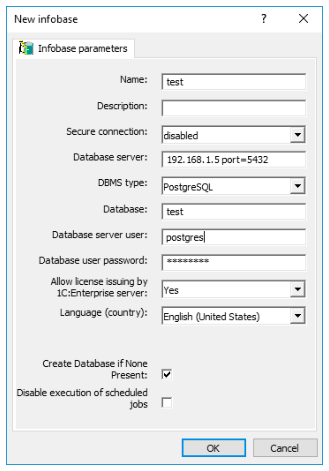
In configuration settings of the 1C information database, specify the IP-address and port of the PostgreSQL server as your database server and choose “PostgreSQL” as the required DBMS type. Specify the name of the database that will be used for 1C and select the “Create database if none present” check box (do not create this database using PostgreSQL means). Provide the name and password of a superuser role that will be used to establish connections.
These recommendations should help you to quickly get started, even though they cannot guarantee optimal performance.
We thank Anton Doroshkevich from the Infosoft company for his assistance in preparing these recommendations.
8 pgAdmin
pgAdmin is a widely used graphical tool for managing PostgreSQL databases. It simplifies common database administration tasks, provides an interface for exploring database objects, and allows users to execute SQL queries.
For many years, pgAdmin 3 was the de facto standard for PostgreSQL administration. However, in 2016, EnterpriseDB discontinued support for pgAdmin 3 and introduced pgAdmin 4, which was completely rewritten in Python and modern web technologies, replacing the original C++ implementation. Initially, pgAdmin 4 received mixed reviews due to its redesigned interface. However, ongoing development has led to significant improvements, making it a more robust and feature-rich tool.
Installation
To launch pgAdmin 4 on Windows, use the installer available at pgadmin.org/download. The installation procedure is straightforward, and the default options are typically sufficient.
For Debian and Ubuntu, add the PostgreSQL repository (see p. 30), then install pgAdmin 4 using the following command:
“pgAdmin4” appears in the list of available programs.
The user interface of this program is fully localized into a dozen languages. To switch to another language, click Configure pgAdmin, select Miscellaneous > User language in the settings window, and then reload the page in your web browser.
Connecting to a Server
To begin, set up a connection to the server. Click the Add New Server button and enter an arbitrary connection name in the General tab of the opened window.
In the Connection tab, enter hostname or address, port number, username, and password.
If you don’t want to enter the password every time, select the Save password checkbox. pgAdmin encrypts stored passwords using a master password, which you will be prompted to set upon first use.
Note that this user must already have a password. For example, for the postgres user, you can do it with the following command:
Click Save to verify the server connection and add it to pgAdmin.
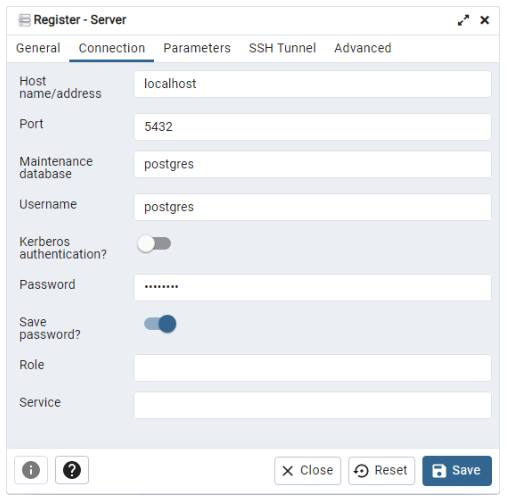
Browser
The left pane displays the Browser tree. Expanding the tree reveals the server, labeled LOCAL in this example. At the next level, you can see all its databases:
appdbhas been created to check connection to PostgreSQL using different programming languages.demois our demo database.postgresis always created when PostgreSQL gets installed.testwas used in the “Trying SQL” chapter (p. 35).
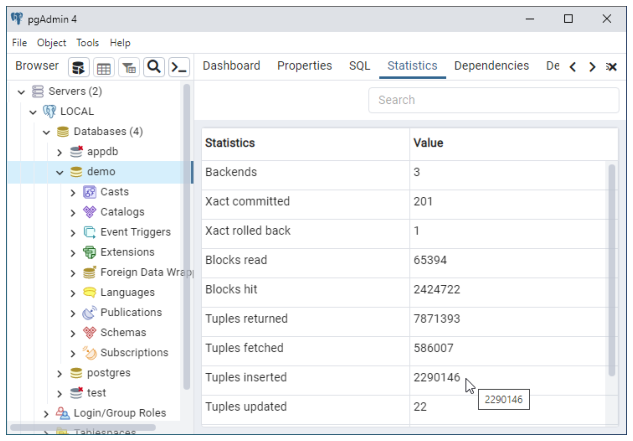
Expanding the Schemas section under appdb reveals the greetings table, along with its columns, constraints, indexes, and triggers.
The context (right-click) menu provides various actions for each object type, including exporting, importing, assigning privileges, and deleting.
The right pane includes several tabs that display reference information:
Dashboard provides system activity charts.
Properties displays the properties of the object selected in the Browser (data types for columns, etc.)
SQL shows the SQL command used to create the selected object.
Statistics lists information used by the query optimizer to build query plans; it can be used by a database administrator for case analysis.
Dependencies, Dependents illustrates dependencies between the selected object and other objects in the database.
Running Queries
To execute a query, open a new SQL editor tab by selecting Tools > Query Tool from the menu.
Type your query in the editor and press F5 to execute it. The Data Output tab in the bottom panel will display the result of the query.
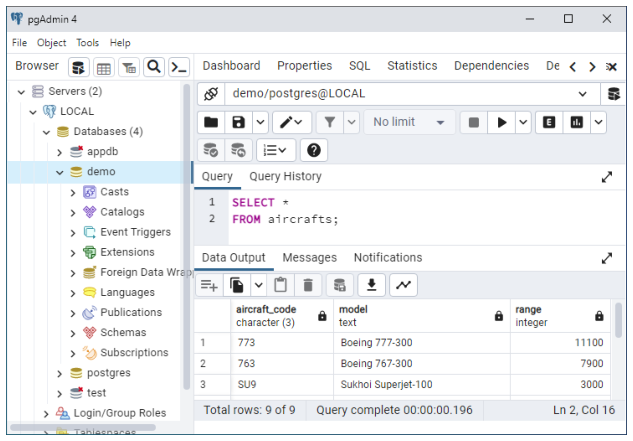
To execute a new query without deleting the previous one, highlight the desired portion of SQL before pressing F5. Thus, the whole history of your actions will be always in front of you. It is usually more convenient than searching for the required query in the log on the Query History tab.
Other Features
pgAdmin provides a graphical user interface for standard PostgreSQL utilities, system catalog information, administration functions, and SQL commands. pgAdmin includes a built-in PL/pgSQL debugger for troubleshooting stored procedures. You can learn about pgAdmin features either on the product website pgadmin.org or in the built-in pgAdmin help system.
9 Additional Features
Full-Text Search
Full-text search refers to searching for documents written in natural language and sorting the results by relevance to the search query. In the simplest and most typical case, the query consists of one or more words, and the relevance is defined by the frequency of these words in the document. This is more or less what happens when we type a phrase in Google or Yandex search engines. However, despite SQL’s powerful capabilities, it is not always sufficient for effective data handling. This has become increasingly evident with the rise of Big Data, which is often poorly structured and difficult to parse.
There is a large number of search engines, free and paid, that enable you to index the whole collection of your documents and set up search of quite decent quality. In this case, the index—an essential search tool for speeding up queries—is separate from the database. It means that many valuable database features become unavailable: database synchronization, transaction isolation, accessing and using metadata to limit the search range, setting up access policies, and many more.
Shortcomings of document-oriented database management systems usually have a similar nature: they have rich full-text search functionality, but data security and synchronization features are of low priority. Besides, such databases (for example, MongoDB) are usually NoSQL ones, so by design, they lack all the power of SQL accumulated over years.
However, traditional SQL database systems do have built-in full-text search capabilities. The LIKE operator is part of the standard SQL syntax, but its flexibility is often insufficient. Therefore, developers had to implement their own extensions of the SQL standard. In PostgreSQL, these are comparison operators ILIKE, ~, ~*, but they don’t solve all the problems either, as they don’t take into account grammatical forms, are not suitable for ranking, and work rather slowly.
When talking about the tools of the full-text search itself, it’s important to understand that they are far from being standardized: each database system uses its own approach and syntax. Russian users of PostgreSQL have some advantage here: its full-text search extensions were created by Russian developers, so there is a possibility to contact the experts directly or even attend their lectures to go into low-level details, if required. Here we’ll only provide some simple examples.
To learn about the full-text search capabilities, we are going to create one more table in the demo database. Let it be a lecturer’s draft notes split into chapters by lecture topics:
Now let’s enter the text of the first lectures for our courses CS301 and CS305:
Check the result:
Now let’s find some information in our database with the help of traditional SQL means (using the LIKE operator):
It’s easy to guess the result: 0 rows. The LIKE operator sees no connection between “fascination” and the words “fascinating” and “fascinated” present in the text.
The query
will return the row from chapter II (but not from chapter I, where the adjective “fascinating” is used):
PostgreSQL provides the ILIKE operator, which allows us not to worry about letter cases; otherwise, you would also have to take uppercase and lowercase letters into account. True, there are also regular expressions (search patterns), and setting them up is a truly engaging task, little short of art, but sometimes you just want a tool that can simply do the job. So let’s add an additional column to the course_chapters table; it will have a special type called tsvector:
As we can see, the rows have changed:
Words are reduced to their root forms (lexemes).
Numbers have appeared. They indicate the word position in the text.
There are no prepositions included (and neither there would be any conjunctions or other parts of the sentence that are unimportant for search; they are the so-called stop words).
The search will be even more efficient if it includes chapter titles, which are also given more weight in respect to the rest of the text (it can be done using the setweight function). Let’s modify the table:
Lexemes are assigned relative weight markers: B and D (possible options are A, B, C, D). We’ll assign real weights when writing queries, which will give us more flexibility.
Fully armed, let’s return to search. The to_tsquery function resembles the to_tsvector function we have seen above: it converts a string to the tsquery data type used in queries.
You can check that the query 'fascinated & database' and its other grammatical variants will return the same result. Here we have used the comparison operator @@, which plays the same role in full-text search as the LIKE operator does in regular search. The syntax of the @@ operator does not allow natural language expressions with spaces, so words in the query are connected by the “and” logical operator.
The english argument indicates the configuration used by PostgreSQL. The configuration defines pluggable dictionaries and the parser, which splits the phrase into separate lexemes.
Despite their name, dictionaries enable all kinds of lexeme transformations. For example, a simple stemmer dictionary like snowball, which is used by default, reduces the word to its unchangeable part; it allows search to ignore word endings in queries. You can also plug in other dictionaries, for example:
regular dictionaries like
ispell,myspell, orhunspell, which can better handle word morphologydictionaries of synonyms
thesaurus
unaccent, which can remove diacritics from letters
Thanks to assigned weights, the displayed search results are ranked:
The {0.1, 0.0, 1.0, 0.0} array sets the weights. It is an optional argument of the ts_rank_cd function. By default, array {0.1, 0.2, 0.4, 1.0} corresponds to D, C, B, A. The word’s weight affects ranking of the returned row.
In the final experiment, let’s modify the display format. Suppose we would like to highlight the found words in the html page using the bold type. The ts_headline function specifies the symbols used to highlight words and sets the minimum and maximum number of words displayed in a single line:
To speed up full-text search, special indexes are used: GiST, GIN, and RUM, which are different from regular database indexes. However, like many other useful full-text search features, they fall outside the scope of this guide.
To learn more about full-text search, see the documentation: www.postgrespro.com/doc/textsearch.
Using JSON and JSONB
SQL-based relational databases were originally designed with a strong emphasis on data consistency and security, at a time when data volumes were far smaller than they are today. When NoSQL databases appeared, it caused concern in the community: lack of strict consistency support and a much simpler data structure (at first, it was simply a storage of key–value pairs) provided a remarkable search speedup. Actively using parallel computations, they could process unprecedented volumes of information and were easy to scale.
Once the initial shock had passed, it became clear that such a simple structure was insufficient for most practical tasks. Composite keys were introduced, and then groups of keys appeared. To remain competitive, relational database systems began incorporating features commonly associated with NoSQL.
Since changing the database schema in a relational database incurs high costs, a new JSON data type came in handy. Having a hierarchical structure similar to XML, it was first targeted at JavaScript development (hence JS in the title), including AJAX application development. JSON’s flexibility allows developers to store and manage data with dynamic, unpredictable structures without requiring database schema modifications.
Suppose we need to enter personal data into the students demo database. We conducted a survey and collected the information from professors. Some questions in the questionnaire are optional, while other questions include the“add more information at your discretion” and “other” fields. If we followed the traditional approach, the information that does not fit the current structure would require adding multiple new tables and columns with lots of empty fields. As the dataset grows, the whole database may have to be refactored.
We can solve this problem using json or jsonb types. The jsonb type, which appeared after json, stores data in a compact binary form and, unlike json, supports indexes, which can sometimes speed up search by an order of magnitude.
Let’s create a table with JSON objects:
Let’s verify that the data has been correctly inserted. For convenience, we will join the student_details and students tables using the WHERE clause, as the new table does not contain students’ names:
Suppose we are interested in entries that hold information about the students’ merits. Let’s access the values of the “merits” key using a special operator ->>:
We have seen that the two entries are related to Anna and Nina’s merits, but the result is misleading, as Anna’s merits are actually “none.” Let’s fix the query:
The new query only returns Nina, whose merits are real.
However, this method is not always effective. Let’s attempt to retrieve the guitars that Victor plays:
This query won’t return anything. It’s because the corresponding key–value pair is located inside the JSON hierarchy, nested into the pairs of a higher level:
To retrieve the list of guitars, let’s use the #> operator and go down the hierarchy, starting from “hobbies”:
We can see that Victor is a fan of Fender:
The json type has a younger sibling: jsonb. The letter “b” implies the binary (rather than text) format of data storage and structure, which can often result in faster search. Nowadays, jsonb is used much more frequently than json.
Besides the notation differences, the order of values has changed: Alex, who lacks additional information, now appears before Mark. It’s not a disadvantage of jsonb as compared to json, it’s simply its data storage specifics.
The jsonb type is supported by a larger number of operators than json. A most useful one is the “contains” operator @>. It works similar to the #> operator for json.
For example, let’s find the entry that mentions Lucie, one of the mother-of-five’s children:
We have used the jsonb_pretty() function, which formats the output of the jsonb type.
Alternatively, you can use the jsonb_each() function, which expands key–value pairs:
Note that the name of Nina’s child is replaced by an empty space {} in the query. This syntax adds flexibility to the process of application development.
But what’s more important, jsonb allows you to create indexes that support the @> operator, its inverse <@, and many other ones (the GIN index is typically the most efficient). The json type does not support indexes, so for high-load applications it is usually recommended to use jsonb.
To learn more about json and jsonb data types and their associated functions, see the PostgreSQL documentation at postgrespro.com/doc/datatype-json and postgrespro.com/doc/functions-json.
When the SQL:2016 standard was published, which included the SQL/JSON Path language, Postgres Professional developed its implementation, providing the jsonpath type. It was later committed to PostgreSQL 12.
$.a.b.creplaces the'a'->'b'->'c'syntax that had to be used in PostgreSQL 11 or lower.The
$symbol represents the current context element, that is, the JSON fragment that has to be parsed.@represents the current context element in filter expressions. All the paths available in the$expression are searched.*is a wildcard symbol. In expressions with$and@it denotes any value of the path taking the hierarchy into account.**is a wildcard that can denote any part of the path in expressions with$or@, without taking the hierarchy into account. It comes in handy if you don’t know the exact nesting level of the elements.
- The
?operator is used to create a filter similar toWHERE. For example:$.a.b.c ? (@.x > 10).
To find cosplay enthusiasts using the jsonb_path_query() function, you can write the following query:
This query searches only through the JSON branch that begins with the “hobbies” key, checking whether the corresponding value equals “cosplay.” But if we replace “cosplay” with “guitarist,” the query won’t return anything because “guitarist” is used in our table as a key, not as a value of the nested element.
Queries can operate on two hierarchical levels: one inside the path expression, which defines the search area, and the other inside the filter expression, which matches the results with the specified condition. It means there are different ways to reach the same goal.
For example, the query
and the query
return the same result:
In the first example, we defined a filter expression for each entry within the “hobbies.guitarist.band” branch. If we take a look at the JSON itself, we can see that this branch has only one value: “Postgressors.” So there was actually nothing to filter out. In the second example, the filter is applied one step higher, so we have to specify the path to the“group”within the filter expression; otherwise, the filter won’t find any values. If we use such syntax, we have to know the JSON hierarchy in advance. But what if we don’t know the hierarchy?
In this case, we can use the ** wildcard. It is an extremely useful feature! Suppose we are not sure what a “Strat” is: whether it’s a high-altitude balloon, a guitar, or a member of the highest social stratum. But we have to find out whether we have this word in our table at all. Previously, it would have required a complex search through the JSON document (unless we converted jsonb to text). Now you can simply run the following query:
You can learn more about SQL/JSON Path capabilities in the documentation (postgrespro.com/doc/datatype-json#DATATYPE-JSONPATH) and in the article “JSONPath in PostgreSQL: committing patches and selecting apartments” (habr.com/en/company/postgrespro/blog/500440/).
The SQL:2016 Standard defines a few more convenient features and expressions for working with JSON. Eventually, they make their way into PostgreSQL.We will discuss some of them here; for the full list, see the documentation: postgrespro.com/doc/functions-json.
Let’s get back to our friends Anna, Victor and Nina. They took part in a poll to determine what TV shows the younger generation likes. The results are stored in a table.
s_id int REFERENCES students(s_id),
Database engineers analyze the results. They’ve got a powerful toolkit: aggregation functions, check constraints, an assortment of json(b) tools.
The arrays should first be split into separate elements (unnest). It can be done with jsonb_array_elements, but there’s an issue:
Naturally, the data from the questionnaires has been put into the database carelessly: Student 1432 does not have a corresponding array (of one element only, but still). Just to make sure, use IS [NOT] JSON ARRAY:
We can fix the type with jsonb_set, which can modify jsonb structure:
Now:
Here is our final list. Note that IS JSON ARRAY belongs to a group of predicates, together with IS JSON SCALAR, IS JSON OBJECT and the more general IS JSON. See the documentation for more: postgrespro.com/doc/functions-json.
Integration with External Systems
Real-world applications are not isolated, and they often have to send data to each other. Such interactions can be implemented at the application level, for example, using web services or file exchange, or you can rely on the database functionality for this purpose.
PostgreSQL supports the ISO/IEC 9075-9 standard (SQL/MED, Management of External Data), which defines access to external data sources from SQL via a special mechanism of foreign data wrappers.
The idea is to access external (foreign) data as if it were located in regular PostgreSQL tables. It requires creating foreign tables, which do not contain any data themselves and only redirect all queries to an external data source. This approach facilitates application development, as it allows to abstract from specifics of a particular external source.
Creating a foreign table involves several steps.
The
CREATE FOREIGN DATA WRAPPERcommand plugs in a library for working with a particular data source.The
CREATE SERVERcommand defines a foreign server. You should usually specify such connection parameters as host name, port number, and database name.The
CREATE USER MAPPINGcommand provides username mapping since different PostgreSQL users can connect to one and the same foreign source on behalf of different external users.The
CREATE FOREIGN TABLEcommand creates foreign tables for the specified external tables and views, whileIMPORT FOREIGN SCHEMAallows to import descriptions of some or all tables from the external schema.
Below we’ll discuss PostgreSQL integration with the most popular databases: Oracle, MySQL, SQL Server, and PostgreSQL itself. But first we need to install the libraries required for working with these databases.
Installing Extensions
The PostgreSQL distribution includes two foreign data wrappers: postgres_fdw and file_fdw. The first one is designed for working with external PostgreSQL databases, while the second one works with files on a server. Besides, the community develops and supports various libraries that provide access to many popular databases. To get the full list, take a look at pgxn.org/tag/fdw.
Foreign data wrappers for Oracle, MySQL, and SQL Server are available as extensions:
Oracle — github.com/laurenz/oracle_fdw
SQL Server — github.com/tds-fdw/tds_fdw
Follow the instructions on these web pages to build and install these extensions. If all goes well, you will see the corresponding foreign data wrappers in the list of available extensions. For example, for oracle_fdw:
Oracle
First, let’s create an extension, which will add a foreign data wrapper:
Check that the corresponding wrapper has been added:
The next step is setting up a foreign server. In the OPTIONS clause, you have to specify the dbserver option, which defines connection parameters for the Oracle instance: server name, port number, and instance name.
The PostgreSQL user postgres will be connecting to the Oracle instance as scott.
We’ll import foreign tables into a separate schema. Let’s create it:
Now let’s import some foreign tables. We’ll do it for just two popular tables, dept and emp:
Note that Oracle data dictionary stores object names in uppercase, while PostgreSQL system catalog saves them in lowercase. When working with external data in PostgreSQL, you have to double-quote uppercase Oracle schema names to avoid their conversion to lowercase.
Let’s view the list of foreign tables:
Now run the following queries on the foreign tables to access the external data:
Write operations on external data are also allowed:
MySQL
Create an extension for the required foreign data wrapper:
The foreign server for the external instance is defined by the host and port parameters:
We are going to establish connections on behalf of a MySQL superuser:
The wrapper supports the IMPORT FOREIGN SCHEMA command, but we can also create a foreign table manually:
Check the result:
Just like the Oracle wrapper, mysql_fdw allows both read and write operations.
SQL Server
Create an extension for the required foreign data wrapper:
Create a foreign server:
The required connection information is the same: you have to provide the host name, the port number, and the database name. But the OPTIONS clause takes different parameters as compared to oracle_fdw and mysql_fdw.
We are going to establish connections on behalf of an SQL Server superuser:
Let’s create a separate schema for foreign tables:
Import the whole HumanResources schema into the created PostgreSQL schema:
You can display the list of imported tables using the \det command, or find them in the system catalog by running the following query:
Object names are case-sensitive, so they should be enclosed in double quotes in PostgreSQL queries:
Currently tds_fdw supports only reading; write operations are not allowed.
PostgreSQL
Create an extension and a wrapper:
We are going to connect to another database of the same server instance, so we only have to provide the dbname parameter when creating a foreign server. Other parameters (such as host, port, etc.) can be omitted.
There is no need to specify the password if you create a user mapping within a single cluster:
Import all tables and views of the bookings schema:
Check the result:
To learn more about postgres_fdw, see the documentation: postgrespro.com/doc/postgres-fdw.
Foreign data wrappers are also worth mentioning as the community considers them to be the basis for built-in sharding in PostgreSQL. Sharding is similar to partitioning: they both use a particular criterion to split a table into several parts that are stored independently. The difference is that partitions are stored on the same server, while shards are located on different ones. Partitioning has been available in PostgreSQL for quite a long time. Starting from version 10, this mechanism is being actively developed, and many useful features have already been added: declarative syntax, dynamic partition pruning, support for parallel operations, and other miscellaneous enhancements. You can also use foreign tables as partitions, which virtually turns partitioning into sharding.
However, significant work remains before sharding is fully practical:
- Consistency is not guaranteed: external data is accessed in separate local transactions rather than in a single distributed one.
You can’t duplicate the same data on different servers to enhance fault tolerance.
All actions required to create tables on shards and the corresponding foreign tables have to be done manually.
These challenges are already addressed in Shardman, a new tool developed by Postgres Professional (postgrespro.ru/products/shardman).
Another extension included into the distribution for working with PostgreSQL databases is dblink. It allows you to explicitly manage connections (to connect and disconnect), execute queries, and get the results asynchronously: postgrespro.com/doc/dblink.
10 Education and Certification
Documentation
Reading the documentation is indispensable for professional use of PostgreSQL. It describes all the database features and provides an exhaustive reference that should always be readily available. Here, you can get full and precise information firsthand: it is written by developers themselves and is carefully kept up-to-date at all times. The PostgreSQL documentation is available at www.postgresql.org/docs or postgrespro.com/docs.
At Postgres Professional, we have translated the whole PostgreSQL documentation set into Russian, including the latest version. It is available on our website: postgrespro.ru/docs.
While working on this translation, we also compiled an English-Russian glossary, published at postgrespro.ru/education/glossary. We recommend consulting this glossary when translating English articles into Russian to use consistent terminology familiar to a wide audience.
There are also French (docs.postgresql.fr), Japanese (www.postgresql.jp/document), and Chinese (postgres.cn/docs) translations provided by national communities.
Training Courses
We develop training courses for those who start using PostgreSQL or would like to improve their professional skills.
Courses for database administrators:
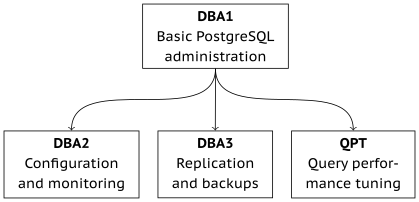
Courses for application developers:
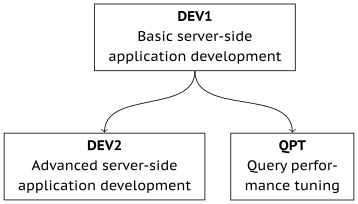
An additional course about our primary product for those who have completed the administration and development courses:
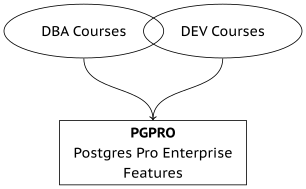
The PostgreSQL and Postgres Pro documentation contains every detail about PostgreSQL, but the information is often scattered across different chapters, so you may have to carefully read it several times before you gain full understanding.
Training courses are intended to complement the documentation rather than replace it. They consist of separate modules that gradually explain a particular topic, focusing on important practical information. Courses can broaden your outlook, structure the previously gained bits of knowledge, and help you find your way around the documentation, should you need to quickly get some particular details.
Each course topic includes theory and practice. In most cases, theory includes both slides and a live demo on a real system. Students receive all course slides with extensive annotations, outputs of demo scripts, solutions to practical assignments, and additional reference materials on select topics.
Where and How to Take a Training
For non-commercial use and self-study, all course materials, including videos, are available on our website for free. You can find their Russian version at postgrespro.ru/education/courses.
The courses currently translated into English are published at postgrespro.com/community/courses.
You can also take these courses at a specialized training center under the supervision of an experienced lecturer. Upon completing the course, you will receive a certificate of completion. Authorized training centers are listed here: postgrespro.ru/education/where.
DBA1. Basic PostgreSQL administration
Duration: 3 days
Background knowledge required:
Basic knowledge of databases and SQL. Familiarity with Unix.
Knowledge and skills gained:
General understanding of PostgreSQL architecture. Installation, initial setup, server management. Logical structure and physical data layout. Basic administration tasks. User and access management. Backup, recovery, and replication.
Topics:
Basic toolkit
- Installation and server management
- Using psql
- Configuration
Architecture
- PostgreSQL overview
- Isolation and multi-version concurrency control
- Vacuum
- Buffer cache and write-ahead log
Data management
- Databases and schemas
- System catalog
- Tablespaces
- Low-level
Administration tasks
- Monitoring
Access control
- Roles and attributes
- Privileges
- Row-level security
- Connection and authentication
Backups
- Overview
Replication
- Overview
Course materials in English are available for self-study at postgrespro.com/community/courses/DBA1.
DBA2. Configuring and monitoring PostgreSQL
Duration: 4 days
Background knowledge required:
SQL fundamentals. Good command of Unix OS. Familiarity with PostgreSQL within the scope of the DBA1 course.
Knowledge and skills gained:
Setting up various configuration parameters based on the understanding of server internals. Monitoring server activity and using the collected data for iterative tuning of PostgreSQL configuration. Configuring localization settings. Managing extensions and getting started with server upgrades.
Topics:
Multi-version concurrency control
- Transaction isolation
- Pages and row versions
- Data snapshots
- HOT updates
- Vacuum
- Autovacuum item Freezing
Logging
- Buffer cache
- Write-ahead log
- Checkpoints
- WAL configuration
Locking
- Object locks
- Row-level locks
- Memory locks
Administration tasks
- Managing extensions
- Localization
- Server upgrades
Course materials in Russian are available for self-study at postgrespro.ru/education/courses/DBA2.
DBA3. Replication and backups
Duration: 2 days
Background knowledge required:
SQL fundamentals. Good command of Unix OS. Familiarity with PostgreSQL within the scope of the DBA1 course.
Knowledge and skills gained:
Taking backups. Setting up physical and logical replication. Recognizing replication use cases. Understanding cluster technologies.
Topics:
Backups
- Logical backup
- Base backup
- WAL archive
Replication
- Physical replication
- Switchover to a replica
- Logical replication
- Usage scenarios
Cluster Technologies
- Overview
Course materials in Russian are available for self-study at postgrespro.ru/education/courses/DBA3.
DEV1. Basic server-side application development
Duration: 4 days
Background knowledge required:
SQL fundamentals. Experience with any procedural programming language. Basic knowledge of Unix OS.
Knowledge and skills gained:
General information about PostgreSQL architecture. Using the main database objects. Programming in SQL and PL/pgSQL on the server side. Using the main data types, including records and arrays. Setting up client-server communication channels.
Topics:
Basic toolkit
- Installation and server management, psql
Architecture
- A general overview of PostgreSQL
- Isolation and MVCC
- Buffer cache and WAL
Data organization
- Logical structure
- Physical structure
Bookstore application
- Application schema and interface
SQL
- Functions
- Procedures
- Composite types
PL/pgSQL
- Overview and programming structures
- Executing queries
- Cursors
- Dynamic commands
- Arrays
- Error handling
- Triggers
- Debugging
Access control
- Access control overview
Backup
- Logical backup
Course materials in English are available for self-study at postgrespro.com/community/courses/DEV1.
DEV2. Advanced server-side application development
Duration: 4 days
Background knowledge required:
General understanding of PostgreSQL architecture. Strong SQL and PL/pgSQL skills. Basic knowledge of Unix OS.
Knowledge and skills gained:
Understanding server internals. Using all PostgreSQL capabilities in application logic implementations. Extending database functionality to address specific tasks.
Topics:
Architecture
- Isolation
- Server internals
- Vacuum
- Write-ahead logging
- Locks
Bookstore
- Bookstore application 2.0
Extensibility
- Connection pooling
- Data types for large values
- User-defined data types
- Operator classes
- Semi-structured data
- Background processes
- Asynchronous processing
- Creating extensions
- Programming languages
- Aggregate and window functions
- Full-text search
- Physical replication
- Logical replication
- Foreign data
Course materials in Russian are available for self-study at postgrespro.ru/education/courses/DEV2.
QPT. Query Performance Tuning
Duration: 2 days
Background knowledge required:
Familiarity with Unix OS. Good command of SQL. Some knowledge of PL/pgSQL will be useful, but is not mandatory. Familiarity with PostgreSQL within the scope of the DBA1 course (for DBAs) or DEV1 (for developers).
Knowledge and skills gained:
In-depth understanding of query planning and execution. Performance tuning of the server instance. Troubleshooting query issues and optimizing queries.
Topics:
Airlines database
Query execution
Sequential scans
Index scans
Bitmap scans
Nested loop joins
Hash joins
Merge joins
Statistics
Query profiling
Optimization methods
Course materials in Russian are available for self-study at postgrespro.ru/education/courses/QPT.
PGPRO. Postgres Pro Enterprise Features
Duration: 2 days
Background knowledge required:
Familiarity with Unix OS. Good command of SQL. Some knowledge of PL/pgSQL will be useful, but is not mandatory.
Familiarity with PostgreSQL within the scope of the courses DBA1, DBA2 and QPT (for DBAs) or DEV1, DEV2 and QPT (for developers).
Knowledge and skills gained:
Proficiency with Postgres Pro Enterprise signature features.
Topics:
Editions and features
Installation, configuration, upgrade
Transaction management
CFS – compressed file system
Query optimization
Adaptive optimization
Performance analysis
Load reporting – pgpro_pwr
User profiles
Audit
Task planner
Backup – 1
Backup – 2
Backup – 3
Synchronized cluster – multimaster
Course materials in Russian are available for self-study at: postgrespro.ru/education/courses/PGPRO.
Professional Certification
The certification program, which was launched in 2019, is useful for both database professionals and their employers. Holding a certificate can give you an advantage when job hunting or negotiating your salary. Besides, it’s a good opportunity to get an impartial evaluation of your knowledge.
For employers, the certification program facilitates recruiting, enables verification of PostgreSQL expertise of the current employees, and provides a means to control the quality of knowledge received in external employee training or to check the competence of third-party vendors and partners.
PostgreSQL certification is currently available only for database administrators, but in the future we plan to launch certification programs for PostgreSQL application developers too.
We offer three levels of certification, all of which require you to pass several tests.
Professional level confirms the knowledge in the following fields:
General understanding of PostgreSQL architecture.
Server installation, working in psql, tuning configuration settings.
Logical and physical data structure.
User and access management.
General understanding of backup and replication concepts.
To obtain a certificate, you must successfully pass a test on the DBA1 course. For new applicants, the PostgreSQL 13 test version is recommended.
Expert level additionally confirms the knowledge in the following fields:
PostgreSQL internals.
Server setup and monitoring, database maintenance tasks.
Performance optimization tasks, query tuning.
Taking backups.
Physical and logical replication setup for various usage scenarios.
There are two certification pathways:
Have the Professional level for PostgreSQL 13 and pass DBA2-13, DBA3-13 and QPT-13 tests (in any order).
Have the Expert level for PostgreSQL 10 and pass the transition test Expert 10–13.
Master level additionally confirms practical skills required for PostgreSQL database administration.
To get a certificate, it is required to have a certificate of the Expert level and successfully pass a hands-on test. This certification is currently under development.
Create an account under postgrespro.ru/user and sign up for a certification test in your profile.
To pass a test, you should have:
a good command of the corresponding courses and the documentation sections they refer to
hands-on experience in working with PostgreSQL via psql
While taking the test, you can refer to our course materials and the PostgreSQL documentation, but usage of any other sources of information is prohibited.
Achieving a particular level is acknowledged by a certificate. Certificates do not expire, but they are tied to a specific PostgreSQL version and will become obsolete as that version is deprecated. So in several years you may want to take a test for a more recent PostgreSQL version.
To learn more about certification, visit postgrespro.ru/education/cert.
Academic Collaboration
Our company is committed to cultivating the next generation of database experts. This requires efforts at the earliest level of education, and it is only possible through collaboration with universities, colleges, and schools.
Academic License
For educational organizations, we provide a free academic license for the Postgres Pro Standard DBMS. To apply, send a request to academy@postgrespro.ru.
Student Internships
We set up student labs at universities to provide internship opportunities. Our experts help the students select a graduation thesis related to PostgreSQL, develop and defend it.
Competitions
Our company participates in organizing hackathons and various competitions for school and university students, including:
the ”Postgres Pro DBMS” section at the IT-Planet Competition: challenge.braim.org/landing/postgres_contest,
the Russian National Open-Source Project Competition: foss.kruzhok.org.
Students who are winners or finalists of competitions hosted by the company or with our involvement, as well as lecturers from partner universities, can take professional certification tests for free. To receive a code for the free certification test, contact us at certification@postgrespro.ru and attach a supporting document.
Academic Courses
We offer several academic courses produced in cooperation with professors from leading universities. All the courses can be used in educational institutions for free. Lecturers can use textbooks, slides, lecture videos, and other educational materials published on our website: postgrespro.ru/education/university.
Postgres Professional has contributed to several courses taught in such universities as Lomonosov Moscow State University, Higher School of Economics, Moscow Aviation Institute, Reshetnev Siberian State University of Science and Technology, and Siberian Federal University. Contact us if you are a university representative and would like to add database courses to the curriculum.
We also seek partnership with teachers and instructors who are ready to develop new original PostgreSQL courses. On our part, we provide all the required support and advice, edit the manuscripts and drive them to publication, as well as make arrangements for open lectures of the course authors in top Russian universities.
SQL Basics
Course participants will learn about PostgreSQL and will be able to start working with it right away; no prior training is required. Starting with simple SQL queries, students will gradually get to more complex constructs, learn about transactions and query optimization.
This course is based on the following textbook (published in Russian):
E. Morgunov, PostgreSQL. SQL Basics. St. Petersburg : BHV-Petersburg, 2018.
ISBN 978-5-9775-4022-3
Contents:
Introduction
Configuring the environment
Basic operations
Data types
DDL fundamentals
Queries
Data manipulation
Indexes
Transactions
Performance tuning
A soft copy of this book in Russian is available on our website: postgrespro.ru/education/books/sqlprimer.
This course includes 36 hours of lectures and hands-on training. The author has been teaching it at top universities in Moscow and Krasnoyarsk for several years. You can download the course materials in Russian at postgrespro.ru/education/university/sqlprimer.

Evgeny Morgunov, Ph.D in Technical Sciences, associate professor at the Informatics and Computer Science Department of Reshetnev Siberian State University of Science and Technology.
Evgeny lives in Krasnoyarsk. Before joining the university in 2000, he worked as a programmer for over 10 years, including developing a banking application system. He got to learn PostgreSQL in 1998. Being an advocate of using free open-source software in academic activities, he has initiated the use of PostgreSQL and FreeBSD operating system as part of the “Programming Technology”course. Evgeny is a member of the International Society for Engineering Pedagogy (IGIP). He has been using PostgreSQL in teaching for more than 20 years.
Database Technology Fundamentals
A modern academic course that combines in-depth theory with relevant practical skills of database design and deployment.
B. Novikov, E. Gorshkova, and N. Grafeeva, Database Technology Fundamentals. 2nd ed. Moscow : DMK Press, 2020.
ISBN 978-5-97060-841-8
The first part contains the key information about database management systems: relational data model, the SQL language, transaction processing.
The second part dives into the underlying database technology and its development trends. Some topics covered in the first part are discussed again at a deeper level.
Contents:
Part I. From Theory to Practice
Introduction
Some database theory
Getting started with databases
Introduction to SQL
Database access management
Transactions and data consistency
Database application development
Relational model extensions
Various types of database systems
Part II. From Practice to Proficiency
Database system architecture
Storage structures and the main algorithms
Query execution and optimization
Transaction management
Database reliability
Advanced SQL features
Database functions and procedures
PostgreSQL extensibility
Full-text search
Data security
Database administration
Replication
Parallel and distributed database systems
A soft copy of this book in Russian is available on our website: postgrespro.ru/education/books/dbtech.
This course offers 24 hours of lectures and 8 hours of hands-on training. It was delivered by Boris Novikov at the faculty of Computational Mathematics and Cybernetics of Lomonosov Moscow State University. You can download the course materials in Russian at postgrespro.ru/education/university/dbtech.

Boris Novikov, Dr. Sci. in Physics and Mathematics, professor at the Informatics Department of Higher School of Economics in St. Petersburg.
His academic interests mainly concern various aspects of designing, developing, and deploying database systems and applications, as well as scalable distributed systems for Big Data processing and analytics.
Ekaterina Gorshkova, Ph.D. in Physics and Mathematics.
An expert in designing high-load data-intensive applications. Her academic interests include machine learning, data-flow analysis, and data retrieval.
Natalia Grafeeva, Ph.D. in Physics and Mathematics, associate professor at the Informatics and Data Analysis Department of St. Petersburg State University.
Her academic interests include databases, data retrieval, Big Data, and smart data analysis. She is an expert in information system design, development, and maintenance, as well as in course design and teaching.
Books
PostgreSQL Internals
This book is for those who will not settle for a black-box approach when working with a database. Targeted at readers who have some experience with PostgreSQL, this book will also be useful for those who are familiar with another database system but switch over to PostgreSQL and would like to understand how they differ.
E. Rogov, PostgreSQL 14 Internals. Moscow : DMK Press, 2022
ISBN 978-5-6045970-4-0 (in English) ISBN 978-5-93700-305-8 (in Russian)

You will not find any ready-made recipes in this book. But the provided explanations of the inner mechanics will enable you to critically evaluate other people’s experience and come to your own conclusions. The author goes into details of PostgreSQL internals and shows how to run experiments and verify information that inevitably gets deprecated.
Egor Rogov has been working in the education department in Postgres Professional since 2015; he develops and teaches training courses, publishes blog posts, writes and edits books.
Contents:
Introduction
Part I. Isolation and MVCC
Isolation • Pages and Tuples • Snapshots • Page pruning and HOT updates • Vacuum and autovacuum • Freezing • Rebuilding tables and indexes
Part II. Buffer cache and WAL
Buffer cache • Write-ahead log • WAL modes
Part III. Locks
Relation-level locks • Row-level locks • Miscellaneous locks • Locks on memory structures
Part IV. Query execution
Query execution stages • Statistics • Table access methods • Index access methods • Index scans • Nested loop • Hashing • Sorting and Merging
Part V. Index types
Hash • B-tree • GiST • SP-GiST • GIN • BRIN
A soft copy of this book is available on our website: postgrespro.com/community/books/internals.
PostgreSQL Monitoring
Monitoring is a critical aspect of PostgreSQL administration. The book encompasses this topic, providing vast information on available tools, tips on how to use them and ways of processing the information you get from them.
This book provides insights into PostgreSQL operations and monitoring techniques, helping readers optimize database performance and effectively address administrative challenges.
A. Lesovsky, PostgreSQL Monitoring. Moscow : Bumba, 2024
ISBN 978-5-907754-42-3
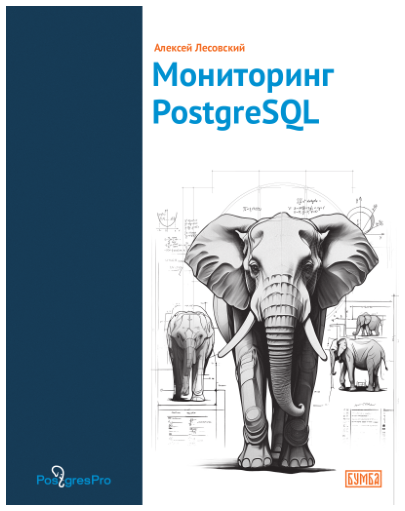
Contents:
Introduction
About this book
Statistics overview
Activity statistics
Query and function execution
Databases
Shared memory and input/output
Write-ahead Log
Replication
Vacuum
Operation execution process
Appendix: Testing environment
Alexey Lesovsky is an expert database administrator, system administrator, developer and devops engineer with almost 20 years of experience in managing large-scale complex systems as well as in software design and development.
The book comes together with a docker environment for you to test the examples and run experiments in. It is an interesting read for database administrators, system administrators, reliability experts and performance optimization enthusiasts.
A soft copy of this book in Russian is available on our website: postgrespro.ru/education/books/monitoring.
A Database Guide
The book outlines the architectural foundations of all modern database management systems and explains the algorithms and data structures they utilize. Special attention is paid to the implementation of the same principles in functionally similar platforms.
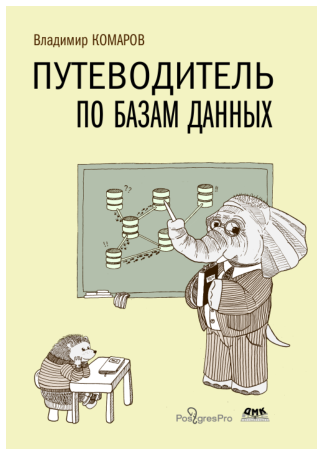
A must-read for anyone dissatisfied with their “Software Engineering in Three Months” course. It supplements purely practical skills by giving understanding of underlying patterns. This is a book for software architects and senior developers—the elite and those aspiring to join their ranks.
V. Komarov, A Database Guide. Moscow : DMK Press, 2024
ISBN 978-5-93700-287-7
A soft copy of this book in Russian is available on our website: postgrespro.ru/education/books/dbguide.

Vladimir Komarov is an IT generalist: software developer, database administrator, data and infrastructure architect, lecturer and a bit of a evangelist.
Contents:
Part I. Database Classification
Data models • Extra classification criteria
Part II. Data Access
Storage structures • Data processing
Part III. DBMS Architecture
Data consistency guarantees • DBMS structure
Part IV. Distributed Databases
The distribution compromise Modifying distributed data
Part V. Recovery
Replication • Backup
Part VI. Database Operation
Database management • Hardware • Financials
Part VII. Database Security
Access control • Internal threats
11 The Hacker's Guide to the Galaxy
News and Discussions
Anyone can follow PostgreSQL news, learn about the features planned for the next release, and stay up-to-date with current events.
Plenty of interesting and useful content is published in various related blogs. For example, the planet.postgresql.org website aggregates all the English-language articles in one place. Many articles in Russian can be found at habr.com/hub/postgresql, including those published by Postgres Professional. For some of our articles, an English translation is available at habr.com/en/company/postgrespro/blog/. There are also dedicated YouTube channels, such as youtube.com/RuPostgres and youtube.com/PostgresTV.
There is also a Wiki project (wiki.postgresql.org), where you can find FAQs, training materials, articles about system setup and optimization, migration specifics from different database systems, and much more.
Almost 14 000 Russian-speaking PostgreSQL users subscribe to the “pgsql—PostgreSQL” channel on Telegram (t.me/pgsql), establishing an active and helpful community.
You can also ask your questions on stackoverflow.com. Do not forget to add the “postgresql” tag.
As for Postgres Professional news, they are published in its corporate blog at postgrespro.com/blog.
Mailing Lists
To get all the news firsthand, without waiting for someone to write a blog post, you can subscribe to mailing lists. Following the tradition, PostgreSQL developers discuss all questions exclusively via email.
You can find all the mailing lists at postgresql.org/list. Some of them are:
pgsql-hackers (typically called simply “hackers”), the main list for everything related to development
pgsql-general used to discuss general questions
pgsql-bugs for bug reports
pgsql-docs for documentation
pgsql-translators for translation-related discussions
pgsql-announce to get new release announcements
and many more.
Once you sign up, you will start receiving regular emails and will be able to participate in discussions if you wish. Another option is to browse through the email archive at postgresql.org/list or on our company’s website (postgrespro.com/list).
Commitfest
Another way to keep up with the news without spending too much time is to check the commitfest.postgresql.org page. Here the community opens the so-called commitfests for developers to submit their patches. For example, commitfest 01.03.2024–31.03.2024 was open for version 17, while commitfest 01.07.2024–31.07.2024 was related to the next version already. It allows the community to stop accepting new features at least about six months before the release and have the time to stabilize the code.
Patches undergo several stages: first, they are reviewed and fixed, and then they are either accepted, moved to the next commitfest, or rejected (if you are completely out of luck).
This way, you can stay informed about new features already included in PostgreSQL or planned for the next release.
Conferences
Moscow, St. Petersburg, and other cities in Russia host the annual international conference PGConf (pgconf.ru), attended by hundreds of PostgreSQL users and developers.
Besides, several Russian cities host conferences on broader topics, including databases in general and PostgreSQL in particular. We will name only a few:
HighLoad++ in Moscow and other cities (highload.ru);
CodeFest in Novosibirsk (codefest.ru);
DUMP in St. Petersburg (dump-spb.ru) and Ekaterinburg (dump-ekb.ru);
Stachka in Ulyanovsk (nastachku.ru);
Heisenbug in Moscow (heisenbug.ru);
Sysconf in Moscow (sysconf.pro).
Naturally, PostgreSQL conferences are held all over the world. The major ones are:
PGCon in Ottawa, Canada (pgcon.org)
PGConf Europe (pgconf.eu)
The list of upcoming events can be found at postgresql.org/about/events.
In addition to conferences, there are less official regular meetups, including online ones.
12 Postgres Professional
Postgres Professional company was founded in 2015; it unites key Russian developers whose contributions to PostgreSQL are recognized in the global community. Fostering database development expertise in Russia, the company currently employs about 400 developers, architects, engineers, and other specialists.
Postgres Professional company delivers several versions of Postgres Pro database system based on PostgreSQL, as well as develops new core features and extensions and provides support for application system design, maintenance, and migration to PostgreSQL.
The company pays much attention to education. It hosts PgConf.Russia, the largest international annual PostgreSQL conference in Moscow, and participates in other conferences all over the world.
Contact information:
7A Dmitry Ulyanov str., Moscow, Russia, 117036
+7 495 150-06-91
Postgres Pro Database System
Postgres Pro is a Russian commercial database system developed by the Postgres Professional company. Based on the open-source PostgreSQL database system, Postgres Pro offers many additional features to satisfy the needs of enterprise customers. It is included in the unified register of Russian software.
Postgres Pro Standard includes all PostgreSQL features, along with additional extensions and core patches, including those that have not yet been accepted by the community. As a result, its users can get access to useful functionality and improve performance without having to wait for the next PostgreSQL version to be released.
Postgres Pro Enterprise is a considerably reworked version of the database system; offering better stability and increased performance, it can address challenging production-level tasks.
Both Postgres Pro versions have been extended with the required information security functionality and are certified by FSTEC (Federal Service for Technical and Export Control).
To use any Postgres Pro version, you must purchase a license. A trial version is available for free, and you can also obtain Postgres Pro at no cost for educational purposes or application development.
Educational institutions are eligible for a free academic Postgres Pro Standard license.
To learn more about the features specific to different Postgres Pro versions, go to postgrespro.com/products.
Postgres Pro Enterprise Manager
Postgres Pro Enterprise Manager (PPEM) is an integrated control panel for Postgres Pro Enterprise.
PPEM is an all-in-one console with a streamlined monitoring and control interface. It lets you perform general administration tasks in the browser and aggregates access to all your databases and instances. PPEM increases the database administration team’s efficiency and speeds up daily administrative tasks.
For details, see: postgrespro.ru/products/PPEM.
Postgres Pro Backup Enterprise
Postgres Pro Backup Enterprise (pg_probackup) is a cluster backup and recovery tool for PostgreSQL.
It utilizes a centralized backup catalog, stored locally or remotely (including an S3 storage).
Pro Backup supports page-level incremental backup, backup storage policies, integrity verification, point-in-time recovery, parallel backup and recovery, data compression, and CFS file systems.
For details, see: postgrespro.ru/products/pg_probackup.
Shardman
Shardman is a PostgreSQL-based distributed relational DBMS with all the extended features of Postgres Pro.
Shardman is PostgreSQL-compatible, provides strong guarantees of data isolation and consistency, enables horizontal scaling, and boasts built-in redundancy mechanisms.
For details, see: postgrespro.ru/products/shardman.
Careers
We are always looking for people who want to help grow the Postgres ecosystem and the open source community at large.
The Postgres Professional team comprises the majority of Russian PostgreSQL contributors. We develop kernel-level code for PostgreSQL and its extensions, create ecosystem products for database monitoring and administration. Our experts develop DBaaS solutions, carry out technical audits and migrations, offer technical support, participate in research, and drive innovation.
We are looking for system software engineers, backend and frontend developers, DevOps, QA engineers, database administrators, and other specialists. For details, check out our career portal: career.postgrespro.ru.
Services
Fault-Tolerant Solutions for Postgres
Designing and implementing high-load, high-performance, and fault-tolerant production systems; providing consulting services. Deploying Postgres and optimizing system configuration.
Vendor Technical Support
24x7 support for Postgres Pro and PostgreSQL: system monitoring, disaster recovery, incident analysis, performance management, debugging both core features and extensions.
Migration of Application Systems
Estimating the complexity of migration to Postgres from other database systems. Defining the architecture and the required changes for new solutions. Migrating application systems to Postgres and providing support during migration.
Postgres Training
Courses for database administrators, system architects, and application developers covering Postgres specifics and efficient use of its advantages.
Database System Audit
Database system evaluation by Postgres Professional experts. Information security audit for Postgres-based systems.
A complete list of services is available at postgrespro.com/services.
Publication and Credits
Pavel Luzanov
Egor Rogov
Igor Levshin
Postgres. The First Experience
Translated by Liudmila Mantrova
and Alexander Meleshko
Cover design by Eteri Bezhashvili
11th edition, revised and updated
postgrespro.com/community/books/introbook
© Postgres Professional, 2016–2025
ISBN 978-5-6045970-8-8