# Demo Database
> Explore the airline bookings demonstration database, its tables and views, and SQL queries using realistic flight data.
---
LLMS index: [llms.txt](/en/llms.txt)
---
## About the Demo Database {#intro-section-5-1}
### Overview {#intro-subsection-5-1-1}
To get to grips with more complex queries, we need to create a more substantial database (with not just three but eight tables) and fill it up with some reasonable data.
We have chosen airline flights as the subject area. Our database contains statistics on all flights operated by a hypothetical airline within a specific timeframe. These scenarios must be familiar to anyone who has ever traveled by plane, but we’ll explain everything anyway.
The database schema is shown on p. [63](/en/05-demo-database/#intro-subsection-5-1-1). We aimed for a balance: keeping the database schema simple without unnecessary complexity, yet detailed enough to support interesting and meaningful queries.
The main entity in our schema is a **booking** (mapped to the `bookings` table). Each booking can include several passengers, with a separate **ticket** issued for each passenger (`tickets`). We do not have any reliable unique ID for a passenger as a person (who might have flown with our airline multiple times), so the passenger does not constitute a separate entity. We will assume that all the passengers are unique.
Each ticket always contains one or more **flight segments** (`ticket_flights`). A single ticket can include multiple segments if there are no direct flights between the departure and arrival airports or if it is a round-trip ticket.
It is assumed that all tickets in a single booking have the same flight segments, even though there is no such constraint in the schema.
Each **flight** (`flights`) goes from one **airport** (`airports`) to another. Flights with the same flight number have the same points of departure and destination but different departure dates.
At flight check-in, each passenger is issued a **boarding pass** (`boarding_passes`), where the seat number is specified. Passengers can check in for the flight only if they have a ticket for this flight. The flight/seat combination must be unique to avoid issuing several boarding passes for the same seat.
The number of **seats** in the aircraft and their distribution between different travel classes depend on the specific model of the **aircraft** performing the flight. It is assumed that each aircraft model has only one cabin configuration. The database schema does not include any checks on whether the seat specified in the boarding pass is actually available in the particular aircraft.
In the sections that follow, we’ll describe each of the tables, as well as additional views and functions. You can always use the `\d+` command to get the exact definition of any table, including data types and column descriptions.
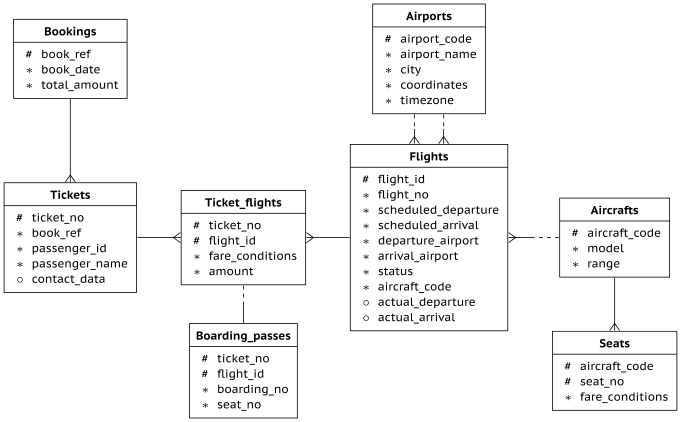
{#intro-fig-5-1 num="5.1" caption="Bookings database relationships" .book-original-figure width=681 height=422}
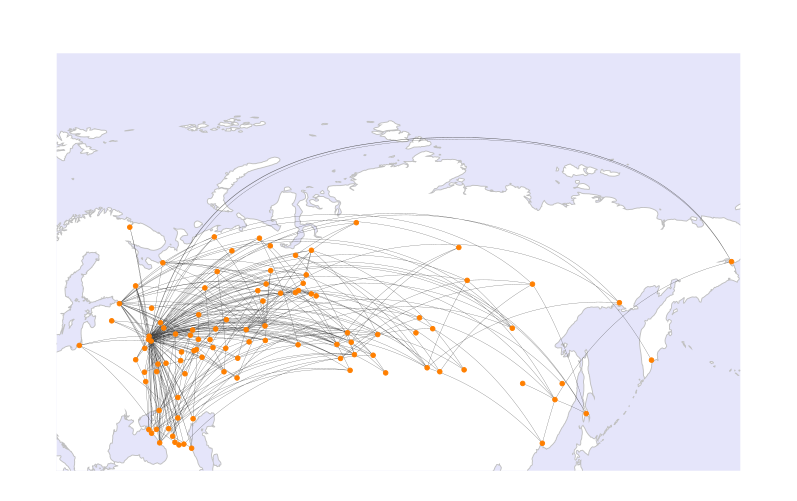
{#intro-fig-5-2 num="5.2" caption="Airports and routes in the demo database" .book-original-figure width=797 height=501}
### Bookings {#intro-subsection-5-1-2}
Passengers must book their tickets in advance. The booking date (`book_date`) must be within one month of the flight. The booking is identified by its number (`book_ref`, a six-position combination of letters and digits).
The `total_amount` field stores the total price of all tickets included into the booking, for all passengers.
### Tickets {#intro-subsection-5-1-3}
A ticket has a unique number (`ticket_no`), which consists of 13 digits.
The ticket contains the number of the passenger’s identity document (`passenger_id`), as well as the passenger’s first and last names (`passenger_name`) and contact information (`contact_data`).
Since a passenger’s ID or name may change (e.g., due to a name change or passport renewal), uniquely identifying all tickets belonging to a single passenger is not always possible. For simplicity, let’s assume that all the passengers are unique.
### Flight Segments {#intro-subsection-5-1-4}
A flight segment links a ticket to a flight and is identified by both the ticket number and the flight number.
Each flight segment has its price (`amount`) and travel class (`fare_conditions`).
### Flights {#intro-subsection-5-1-5}
A unique ID can be either natural (if it is related to real-life objects) or surrogate (if it is generated by the system, typically as an increasing sequence of numbers).
The natural composite key of the `flights` table consists of the flight number (`flight_no`) and the date of the departure (`scheduled_departure`). To make foreign keys that refer to this table a bit shorter, a surrogate key `flight_id` is used as the primary key.
Each flight departs from one airport (`departure_airport`) and arrives at another (`arrival_airport`).
There is no such entity as a “connecting flight”: if there are no direct flights from one airport to another, the ticket simply includes all the required flight segments.
Each flight has a scheduled date and time of departure and arrival (`scheduled_departure` and `scheduled_arrival`). However, actual departure and arrival times (`actual_departure` and `actual_arrival`) may vary due to delays, which can range from a few minutes to several hours.
Flight `status` can take one of the following values:
- Scheduled The flight can be booked. This value is set one month before the planned departure date; at this point, the information about the flight is entered into the database.
- On Time The flight is open for check-in (twenty-four hours before the scheduled departure) and is not delayed.
- Delayed The flight is open for check-in (twenty-four hours before the scheduled departure), but is delayed.
- Departed The aircraft has already departed and is airborne.
- Arrived The aircraft has reached the point of destination.
- Cancelled The flight is cancelled.
### Airports {#intro-subsection-5-1-6}
An airport is identified by a three-letter `airport_code` and has an `airport_name`.
There is no separate entity for the `city`; a city name is simply an airport attribute, which is required to identify all the airports of the same city. The table also includes `coordinates` (longitude and latitude) and the `timezone`.
### Boarding Passes {#intro-subsection-5-1-7}
At the time of check-in, which opens twenty-four hours before the scheduled departure, the passenger is issued a boarding pass. Each boarding pass is uniquely identified by a combination of ticket and flight numbers.
Boarding pass numbers (`boarding_no`) are assigned sequentially based on check-in order. They are unique only within a specific flight. The boarding pass specifies the seat number (`seat_no`).
### Aircraft {#intro-subsection-5-1-8}
Each aircraft model is identified by a three-character `aircraft_code`. The table also includes the name of the aircraft `model` and the maximum flying distance, in kilometers (`range`).
### Seats {#intro-subsection-5-1-9}
Seats define the cabin configuration of each aircraft model. Each seat has a number (`seat_no`) and an assigned travel class (`fare_conditions`): Economy, Comfort, or Business.
### Flights View {#intro-subsection-5-1-10}
There is a `flights_v` view built over the `flights` table. Views can be queried in the same way as tables, but they do not store any data: they simply perform a particular query. The following psql command displays the definition of the view and its query:
```psql
postgres=# \d+ flights_v
```
This view adds the following information:
- details about the airport of departure `departure_airport`, `departure_airport_name`, `departure_city`
- details about the airport of arrival `arrival_airport`, `arrival_airport_name`, `arrival_city`
- local departure time `scheduled_departure_local`, `actual_departure_local`
- local arrival time `scheduled_arrival_local`, `actual_arrival_local`
- flight duration `scheduled_duration`, `actual_duration`
### Routes View {#intro-subsection-5-1-11}
The `flights` table contains some redundancies, which you can use to get route information that does not depend on the exact flight dates (flight number, airports of departure and destination, aircraft model).
This information constitutes the `routes` view. Besides, this view shows the `days_of_week` array representing days of the week on which flights are performed, and the planned flight `duration`.
### The “now” Function {#intro-subsection-5-1-12}
The demo database contains a snapshot of data, similar to a backup of a real system captured at some point in time. For example, if a flight has the Departed status, it means that the aircraft was airborne at the time the backup was taken.
The snapshot time is saved in the `bookings.now` function. You can use this function in demo queries for cases that would typically require calling the `now` function.
Besides, the return value of this function determines the version of the demo database. The latest version, as of August 15, 2017, contains data from that date.
## Installation {#intro-section-5-2}
### Installation from the Website {#intro-subsection-5-2-1}
The demo database is available in three flavors, which differ only in the data size:
- [edu.postgrespro.com/demo-small-en.zip]() A small database with flight data for one month (21 MB, DB size is 280 MB).
- [edu.postgrespro.com/demo-medium-en.zip]() A medium database with flight data for three months (62 MB, DB size is 702 MB).
- [edu.postgrespro.com/demo-big-en.zip]() A large database with flight data for one year (232 MB, DB size is 2638 MB).
A small database is quite suitable for learning how to write queries, but if you would like to deal with query optimization specifics, choose the large database: then you’ll be able to see how queries work on large volumes of data.
The files contain a logical backup of the `demo` database created with the `pg_dump` utility. Note that if you already have some database named `demo`, it will be dropped and restored from this backup. The user who runs the script becomes the owner of this database.
To install the demo database on a Linux system, switch to the `postgres` user and download the corresponding file. For example, to download the small database, do the following:
```bash
$ sudo su - postgres
```
```bash
$ wget https://edu.postgrespro.com/demo-small-en.zip
```
Then run the following command:
```bash
$ zcat demo-small-en.zip | psql
```
On Windows, download the [edu.postgrespro.com/demo-small-en.zip]() file, double-click it to open the archive, and copy the `demo-small-en-20170815.sql` file into the `C:\Program Files\PostgreSQL\17` directory.
The pgAdmin application (described on p. [111](/en/08-pgadmin/#intro-chapter-8)) does not support restoring databases from this type of backup. So you should start psql (by clicking the “SQL Shell (psql)” shortcut) and run the following command:
```text
postgres# \i demo-small-en-20170815.sql
```
If the file is not found, check the “Start in” property of the shortcut; the file must be located in this directory.
## Sample Queries {#intro-section-5-3}
### A Couple of Words about the Schema {#intro-subsection-5-3-1}
Once installation is complete, launch `psql` and connect to the demo database:
```psql
postgres=# \c demo
You are now connected to database "demo" as user
"postgres".
```
The `bookings` schema contains all necessary entities. When connected to the database, this schema is used automatically, so there is no need to specify it explicitly:
```psql
demo=# SELECT * FROM aircrafts;
```
```text
aircraft_code | model | range
---------------+---------------------+-------
773 | Boeing 777-300 | 11100
763 | Boeing 767-300 | 7900
SU9 | Sukhoi Superjet-100 | 3000
320 | Airbus A320-200 | 5700
321 | Airbus A321-200 | 5600
319 | Airbus A319-100 | 6700
733 | Boeing 737-300 | 4200
CN1 | Cessna 208 Caravan | 1200
CR2 | Bombardier CRJ-200 | 2700
(9 rows)
```
However, we must specify the schema for the `bookings.now` function, as we have to differentiate it from the standard `now` function:
```psql
demo=# SELECT bookings.now();
```
```text
now
------------------------
2017-08-15 18:00:00+03
(1 row)
```
The following query returns cities and airports:
```psql
demo=# SELECT airport_code, city
FROM airports LIMIT 4;
```
```text
airport_code | city
--------------+---------------
YKS | Yakutsk
MJZ | Mirnyj
KHV | Khabarovsk
PKC | Petropavlovsk
(4 rows)
```
The contents of the database is provided in English and in Russian. You can switch between these languages by setting the `bookings.lang` parameter to `en` or `ru`, respectively. By default, the English language is selected. You can change this setting as follows:
```psql
demo=# ALTER DATABASE demo SET bookings.lang = ru;
```
```sql
ALTER DATABASE
```
The language has been changed at the database level; now we have to reconnect to the database.
```psql
demo=# \c
```
```text
You are now connected to database "demo" as user
"postgres".
```
```psql
demo=# SELECT airport_code, city
FROM airports LIMIT 4;
```
```text
airport_code | city
--------------+--------------------------
YKS | Якутск
MJZ | Мирный
KHV | Хабаровск
PKC | Петропавловск-Камчатский
(4 rows)
```
To understand how it works, take a look at the `aircrafts` or `airports` definition using the `\d+ psql` command.
If you want to learn more about managing schemas, see the documentation: [postgrespro.com/doc/ddl-schemas.]()
For more details on setting configuration parameters, see [postgrespro.com/doc/config-setting.]()
### Simple Queries {#intro-subsection-5-3-2}
Let’s use this schema to discuss several problems, starting from the simplest questions and getting to more complex ones. Most problems are followed by a solution, but if you want to learn SQL effectively, try to write your own query before looking at the answer.
**Problem.** Who traveled from Moscow (SVO) to Novosibirsk (OVB) on seat 1A the day before yesterday, and when was the ticket booked?
**Solution.** “The day before yesterday” is counted from the `booking.now` value, not from the current date.
```sql
SELECT t.passenger_name,
b.book_date
FROM bookings b
JOIN tickets t
ON t.book_ref = b.book_ref
JOIN boarding_passes bp
ON bp.ticket_no = t.ticket_no
JOIN flights f
ON f.flight_id = bp.flight_id
WHERE f.departure_airport = 'SVO'
AND f.arrival_airport = 'OVB'
AND f.scheduled_departure::date =
bookings.now()::date - interval '2 day'
AND bp.seat_no = '1A';
```
**Problem.** How many seats were unoccupied on flight PG0404 yesterday?
**Solution.** There are several approaches to solving this problem. One of the options is to use the `NOT EXISTS` expression to find the seats without boarding passes:
```sql
SELECT count(*)
FROM flights f
JOIN seats s
ON s.aircraft_code = f.aircraft_code
WHERE f.flight_no = 'PG0404'
AND f.scheduled_departure::date =
bookings.now()::date - interval '1 day'
AND NOT EXISTS (
SELECT NULL
FROM boarding_passes bp
WHERE bp.flight_id = f.flight_id
AND bp.seat_no = s.seat_no
);
```
Another approach uses set subtraction to find the unoccupied seats. Different solutions give the same result but may sometimes differ in performance, so you have to take it into account if it matters.
```sql
SELECT count(*) FROM
(
SELECT s.seat_no
FROM seats s
WHERE s.aircraft_code = (
SELECT aircraft_code FROM flights
WHERE flight_no = 'PG0404'
AND scheduled_departure::date =
bookings.now()::date - interval '1 day'
)
EXCEPT
SELECT bp.seat_no
FROM boarding_passes bp
WHERE bp.flight_id = (
SELECT flight_id FROM flights
WHERE flight_no = 'PG0404'
AND scheduled_departure::date =
bookings.now()::date - interval '1 day'
)
) t;
```
**Problem.** Which flights had the longest delays? Print the list of ten “leaders.”
**Solution.** The query needs to include only those flights that have already departed.
```sql
SELECT f.flight_no,
f.scheduled_departure,
f.actual_departure,
f.actual_departure - f.scheduled_departure
AS delay
FROM flights f
WHERE f.actual_departure IS NOT NULL
ORDER BY f.actual_departure - f.scheduled_departure
DESC
LIMIT 10;
```
You can define the same condition using the `status` column by listing all the applicable statuses. Or you can skip the `WHERE` condition altogether by specifying the `DESC NULLS LAST` sorting order, so that undefined values are returned at the end of the selection.
### Aggregate Functions {#intro-subsection-5-3-3}
**Problem.** What is the shortest flight duration for each possible flight from Moscow to St. Petersburg, and how many times was the flight delayed for more than an hour?
**Solution.** To solve this problem, it is convenient to use the available `flights_v` view instead of dealing with table joins. You need to take into account only those flights that have already arrived.
```sql
SELECT f.flight_no,
f.scheduled_duration,
min(f.actual_duration),
max(f.actual_duration),
sum(CASE WHEN f.actual_departure >
f.scheduled_departure +
interval '1 hour'
THEN 1 ELSE 0
END) delays
FROM flights_v f
WHERE f.departure_city = 'Moscow'
AND f.arrival_city = 'St. Petersburg'
AND f.status = 'Arrived'
GROUP BY f.flight_no,
f.scheduled_duration;
```
**Problem.** Identify the passengers who were the first to check in for all their flights. Consider only those who have taken at least two flights.
**Solution.** Use the fact that boarding pass numbers are issued in the check-in order.
```sql
SELECT t.passenger_name,
t.ticket_no
FROM tickets t
JOIN boarding_passes bp
ON bp.ticket_no = t.ticket_no
GROUP BY t.passenger_name,
t.ticket_no
HAVING max(bp.boarding_no) = 1
AND count(*) > 1;
```
**Problem.** How many passengers can be included into a single booking?
**Solution.** Let’s count the number of passengers in each booking and then find the number of bookings for each number of passengers.
```sql
SELECT tt.cnt,
count(*)
FROM (
SELECT t.book_ref,
count(*) cnt
FROM tickets t
GROUP BY t.book_ref
) tt
GROUP BY tt.cnt
ORDER BY tt.cnt;
```
### Window Functions {#intro-subsection-5-3-4}
**Problem.** For each ticket, display all the included flight segments, together with connection time. Limit the result to the tickets booked a week ago.
**Solution.** Use window functions to avoid accessing the same data twice.
```sql
SELECT tf.ticket_no,
f.departure_airport,
f.arrival_airport,
f.scheduled_arrival,
lead(f.scheduled_departure) OVER w
AS next_departure,
lead(f.scheduled_departure) OVER w -
f.scheduled_arrival AS gap
FROM bookings b
JOIN tickets t
ON t.book_ref = b.book_ref
JOIN ticket_flights tf
ON tf.ticket_no = t.ticket_no
JOIN flights f
ON tf.flight_id = f.flight_id
WHERE b.book_date =
bookings.now()::date - interval '7 day'
WINDOW w AS (PARTITION BY tf.ticket_no
ORDER BY f.scheduled_departure);
```
As you can see, the time cushion between flights can reach up to several days: round-trip tickets and one-way tickets are treated in the same way, and the time of the stay in the point of destination is treated just like the time between connecting flights. Using the solution for one of the problems in the “Arrays” section, you can take this fact into account when building the query.
**Problem.** What are the most frequent combinations of first and last names? What is the ratio of the passengers with such names to the total number of passengers?
**Solution.** The total number of passengers is calculated using a window function.
```sql
SELECT passenger_name,
round( 100.0 * cnt / sum(cnt) OVER (), 2)
AS percent
FROM (
SELECT passenger_name,
count(*) cnt
FROM tickets
GROUP BY passenger_name
) t
ORDER BY percent DESC;
```
**Problem.** Solve the previous problem for first names and last names separately.
**Solution.** Let’s take a look at how to count first names. The query for counting last names will differ only by the `p` subquery.
As this complex query shows, you should avoid using a single text field for different values if you are going to use them separately; in scientific terms, it is called the first normal form.
```sql
WITH p AS (
SELECT left(passenger_name,
position(' ' IN passenger_name))
AS passenger_name
FROM tickets
)
SELECT passenger_name,
round( 100.0 * cnt / sum(cnt) OVER (), 2)
AS percent
FROM (
SELECT passenger_name,
count(*) cnt
FROM p
GROUP BY passenger_name
) t
ORDER BY percent DESC;
```
### Arrays {#intro-subsection-5-3-5}
**Problem.** The database does not explicitly indicate whether the ticket is one-way or round-trip. However, you can figure it out by comparing the first point of departure to the last point of destination. Display airports of departure and destination for each ticket, ignoring connections, and specify whether it’s a round-trip ticket or not.
**Solution.** An easy solution is to use the `array_agg` function to transform the list of airports in the itinerary into an array.
We select the middle element of the array as the airport of destination, assuming that the outbound and inbound ways have the same number of stops.
In this example, the `tickets` table is scanned only once. The array of airports is displayed for clarity; for large volumes of data, it makes sense to remove it from the query since extra data can hamper performance.
```sql
WITH t AS (
SELECT ticket_no,
a,
a[1] departure,
a[cardinality(a)] last_arrival,
a[cardinality(a)/2+1] middle
FROM (
SELECT t.ticket_no,
array_agg( f.departure_airport
ORDER BY f.scheduled_departure) ||
(array_agg( f.arrival_airport
ORDER BY f.scheduled_departure DESC)
)[1] AS a
FROM tickets t
JOIN ticket_flights tf
ON tf.ticket_no = t.ticket_no
JOIN flights f
ON f.flight_id = tf.flight_id
GROUP BY t.ticket_no
) t
)
SELECT t.ticket_no,
t.a,
t.departure,
CASE
WHEN t.departure = t.last_arrival
THEN t.middle
ELSE t.last_arrival
END arrival,
(t.departure = t.last_arrival) return_ticket
FROM t;
```
**Problem.** Find the round-trip tickets in which the outbound route differs from the inbound one.
**Problem.** Find pairs of airports with inbound and outbound flights departing on different days of the week.
**Solution.** The part of the problem that involves building an array of days of the week is virtually solved in the `routes` view. You only have to find the intersection of arrays using the `&&` operator and make sure it’s empty.
```sql
SELECT r1.departure_airport,
r1.arrival_airport,
r1.days_of_week dow,
r2.days_of_week dow_back
FROM routes r1
JOIN routes r2
ON r1.arrival_airport = r2.departure_airport
AND r1.departure_airport = r2.arrival_airport
WHERE NOT (r1.days_of_week && r2.days_of_week);
```
### Recursive Queries {#intro-subsection-5-3-6}
**Problem.** How can you get from Ust-Kut (UKX) to Neryungri (CNN) with the minimal number of connections? What will the flight time be?
**Solution.** This problem requires finding the shortest path in a graph. We will use a recursive query to complete this task.
A detailed step-by-step explanation of this query is published at [habr.com/en/company/postgrespro/blog/490228/.]() Below is a brief summary.
Infinite looping is prevented by checking the `hops` array, which is built while the query is being executed.
Since the query performs a breadth-first search, the first path found will have the fewest connections. To avoid looping through other paths (that can be numerous and are definitely longer than the already found one), the `found` attribute is used. It is calculated using the `bool_or` window function.
```sql
WITH RECURSIVE p(
last_arrival, destination, hops,
flights, flight_time, found
) AS (
SELECT a_from.airport_code,
a_to.airport_code,
array[a_from.airport_code],
array[]::char(6)[],
interval '0',
a_from.airport_code = a_to.airport_code
FROM airports a_from,
airports a_to
WHERE a_from.airport_code = 'UKX'
AND a_to.airport_code = 'CNN'
UNION ALL
SELECT r.arrival_airport,
p.destination,
(p.hops || r.arrival_airport)::char(3)[],
(p.flights || r.flight_no)::char(6)[],
p.flight_time + r.duration,
bool_or(r.arrival_airport = p.destination)
OVER ()
FROM p JOIN routes r
ON r.departure_airport = p.last_arrival
WHERE NOT r.arrival_airport = ANY(p.hops)
AND NOT p.found
)
SELECT hops, flights, flight_time
FROM p
WHERE p.last_arrival = p.destination;
```
It is useful to compare this query with its simpler variant without the `found` trick.
To learn more about recursive queries, see the documentation: [postgrespro.com/doc/queries-with.]()
**Problem.** What is the maximum number of connections that can be required to get from any airport to any other airport?
**Solution.** We can take the previous query as the basis for the solution. However, the first iteration must now contain all the possible airport pairs, not just a single pair: each airport must be connected to all the other airports. For all these pairs of airports we first find the shortest path, and then select the longest of them.
Clearly, it is only possible if the routes graph is connected, but our demo database satisfies this condition.
```sql
WITH RECURSIVE p(
departure, last_arrival,
destination, hops, found
) AS (
SELECT a_from.airport_code,
a_from.airport_code,
a_to.airport_code,
array[a_from.airport_code],
a_from.airport_code = a_to.airport_code
FROM airports a_from,
airports a_to
UNION ALL
SELECT p.departure,
r.arrival_airport,
p.destination,
(p.hops || r.arrival_airport)::char(3)[],
bool_or(r.arrival_airport = p.destination)
OVER (PARTITION BY p.departure,
p.destination)
FROM p JOIN routes r
ON r.departure_airport = p.last_arrival
WHERE NOT r.arrival_airport = ANY(p.hops)
AND NOT p.found
)
SELECT max(cardinality(hops)-1)
FROM p
WHERE p.last_arrival = p.destination;
```
This query also uses the `found` attribute, but here it should be calculated separately for each pair of airports.
**Problem.** Find the shortest route from Ust-Kut (UKX) to Neryungri (CNN) from the flight time perspective (ignoring connection time).
**Solution.** To avoid infinite looping, we use the `CYCLE` clause introduced in PostgreSQL 14.
```sql
WITH RECURSIVE p(
last_arrival, destination,
flights, flight_time,
min_time
) AS (
SELECT a_from.airport_code,
a_to.airport_code,
array[]::char(6)[],
interval '0',
NULL::interval
FROM airports a_from,
airports a_to
WHERE a_from.airport_code = 'UKX'
AND a_to.airport_code = 'CNN'
UNION ALL
SELECT r.arrival_airport,
p.destination,
(p.flights || r.flight_no)::char(6)[],
p.flight_time + r.duration,
least(
p.min_time, min(p.flight_time+r.duration)
FILTER (
WHERE r.arrival_airport = p.destination
) OVER ()
)
FROM p
JOIN routes r
ON r.departure_airport = p.last_arrival
WHERE p.flight_time + r.duration <
coalesce(p.min_time, interval '1 year')
)
CYCLE last_arrival SET is_cycle USING hops
```
```sql
SELECT hops,
flights,
flight_time
FROM (
SELECT hops,
flights,
flight_time,
min(min_time) OVER () min_time
FROM p
WHERE p.last_arrival = p.destination
) t
WHERE flight_time = min_time;
```
Note that the found route may be suboptimal with regards to the number of connections.
### Functions and Extensions {#intro-subsection-5-3-7}
**Problem.** Find the distance between Kaliningrad (KGD) and Petropavlovsk-Kamchatsky (PKC).
**Solution.** The `airports` table contains airport coordinates. To accurately calculate the distance between two points, the Earth’s curvature must be considered. This task is best performed by the PostGIS extension, which can approximate the Earth surface as a geoid.
However, a simple spherical model is sufficient for this example. Let’s use the `earthdistance` and then convert the result from miles to kilometers.
```sql
CREATE EXTENSION IF NOT EXISTS cube;
```
```sql
CREATE EXTENSION IF NOT EXISTS earthdistance;
```
```sql
SELECT round(
(a_from.coordinates <@> a_to.coordinates) *
1.609344
)
FROM airports a_from,
airports a_to
WHERE a_from.airport_code = 'KGD'
AND a_to.airport_code = 'PKC';
```
**Problem.** Draw the graph of flights between all the airports.