4 Trying SQL
Connecting via psql
To connect to the database server and start executing commands, you need to have a client application. In the “PostgreSQL for Applications” chapter, we will talk about sending queries from applications written in different programming languages. And here we’ll explain how to work with the psql client from the command line in interactive mode.
Unfortunately, many people are not very fond of the command line nowadays. Yet it is really worth mastering.
First of all, psql is a standard client application included in all PostgreSQL packages, so it’s always available. Having a customized environment is beneficial, but there is no need to get lost on an unfamiliar system.
Secondly, psql is really convenient for everyday DBA tasks, writing small queries, and automating processes. For example, you can use it to periodically deploy application code updates on your database server. The psql client provides its own commands that can help you find your way around database objects and display the data stored in tables in a convenient format.
However, if you are used to working in graphical user interfaces, try pgAdmin (we’ll get back to it later) or other similar products: wiki.postgresql.org/wiki/Community_Guide_to_PostgreSQL_GUI_Tools.
To start psql on a Linux system, run this command:
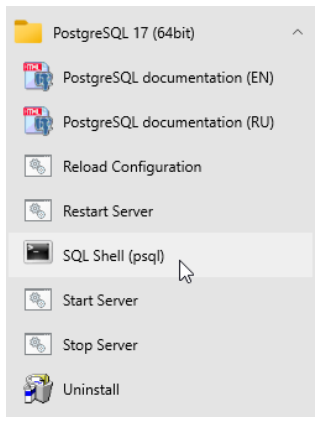
On Windows, open the Start menu and launch the “SQL Shell (psql)” program. When prompted, enter the password for the postgres user that you set when installing PostgreSQL.
Windows users may run into encoding issues when viewing non-Latin characters in the terminal. If that is the case, make sure that a TrueType font is selected in the properties of the terminal window (typically, “Lucida Console” or “Consolas”).
As a result, you should see the same prompt on both operating systems: postgres=#. Here “postgres” is the name of the database to which you are connected right now. A single PostgreSQL server can serve several databases, but you can work only with one of them at a time.
Now let’s try out some commands. Enter only the part printed in bold; the prompt and the system response are provided here solely for your convenience.
Databases
Let’s create a new database called test:
Don’t forget to finish each command with a semicolon: PostgreSQL expects you to continue typing until you enter this symbol (so you can split the command between multiple lines).
Now let’s connect to the created database:
As you can see, the command prompt has changed to test=#.
The command that we’ve just entered does not look like SQL, as it starts with a backslash. This is a convention for special commands that can only be run in psql. If you are using pgAdmin or another GUI tool, skip all commands starting with a backslash or find an equivalent.
There are quite a few psql commands, and we’ll use some of them a bit later. To get the full list of psql commands right now, you can run:
Since the reference information is quite bulky, it will be displayed in a pager program of your operating system, which is usually more or less.
Tables
Relational database management systems present data as tables. The structure of the table is defined by its columns; the data itself is stored in table rows. The data is not ordered, so rows are not necessarily stored in the same order they were added to the table.
For each column, a data type is defined. All the values in the corresponding row fields must belong to this type. You can use multiple built-in data types provided by PostgreSQL (postgrespro.com/doc/datatype) or add your own custom types, but here we’ll cover just a few main ones:
integertextboolean, which is a logical data type takingtrueorfalsevalues
Apart from regular values defined by the data type, a field can be NULL. It can be interpreted as “the value is unknown” or “the value is not set.”
Let’s create a table of university courses:
Note that the psql command prompt has changed: it is a hint that the command continues on the new line. For convenience, we will not repeat the prompt on each line in the examples that follow.
The above command creates the courses table with three columns: c_no specifies the course number represented as a text string, title provides the course title, and hours lists an integer number of lecture hours.
Apart from columns and data types, we can define integrity constraints that will be checked automatically: PostgreSQL will not allow invalid data in the database. In this example, we have added the PRIMARY KEY constraint for the c_no column. It means that all the values in this column must be unique, and NULLs are not allowed. Such a column can be used to distinguish one table row from another. The postgrespro.com/doc/ddl-constraints page lists all the available constraints.
You can find the exact syntax of the CREATE TABLE command in the documentation, or view command-line help right in psql:
Such reference information is available for each SQL command. To get the full list of SQL commands, run \help without arguments.
Filling Tables with Data
Let’s insert some rows into the created table:
If you need to perform a bulk data upload from an external source, the INSERT command is not the best choice. Instead, you can use the COPY command specifically designed for this purpose: postgrespro.com/doc/sql-copy.
We’ll need two more tables for subsequent examples: students and exams.
For each student, we are going to store their name and the year of admission (start year). The student ID number will serve as the student’s identifier.
The exams table contains all the scores received by students in the corresponding course. Thus, students and courses are connected by the many-to-many relationship: each student can take exams in multiple courses, and each exam can be taken by multiple students.
Each table row is uniquely identified by the combination of a student ID and a course number. Such an integrity constraint pertaining to several columns at once is defined by the CONSTRAINT clause:
Besides, the REFERENCES clause here defines two referential integrity checks called foreign keys. Such keys show that the values of one table reference rows of another table.
After any action performed on the database, PostgreSQL checks that all the s_id identifiers in the exams table correspond to real students (that is, entries in the students table), while c_no course numbers correspond to real courses. Thus, it is impossible to assign a score on a non-existing subject or to a non-existent student, regardless of the user actions or possible application errors.
Let’s assign several scores to our students:
Data Retrieval
Simple Queries
To read data from tables, use the SQL operator SELECT. For example, let’s display two columns of the courses table. The AS clause allows you to rename the column if required:
The asterisk * displays all the columns:
In production applications, it is recommended to explicitly specify only those columns that are really needed: then the query is performed more efficiently, and the result does not depend on new columns that may appear. But in interactive queries you can simply use an asterisk.
The result can contain several rows with the same data. Even if all rows in the original table are different, the data can appear duplicated if not all the columns are displayed:
To select all different start years, specify the DISTINCT keyword after SELECT:
For details, see the documentation: postgrespro.com/doc/sql-select#SQL-DISTINCT.
In general, you can use any expressions after the SELECT operator. And if you omit the FROM clause, the query will return a single row. For example:
When you select some data from a table, it is usually required to return only those rows that satisfy a certain condition. This filtering condition is specified in the WHERE clause:
The condition must be of a logical type. For example, it can contain operators =, <> (or !=), >, >=, <, <=, as well as combine simple conditions using logical operations AND, OR, NOT, and parenthesis (like in regular programming languages).
Handling NULLs is a bit more subtle. The result will contain only those rows for which the filtering condition is true; if the condition is false or undefined, the row is excluded.
Remember:
The result of comparing something to
NULLis undefined.The result of logical operations on
NULLs is usually undefined (exceptions:true OR NULL = true,false AND NULL = false).To check whether the value is undefined, the following operators are used:
IS NULL(IS NOT NULL) andIS DISTINCT FROM(IS NOT DISTINCT FROM).
The coalesce expression is often used to replace NULL values with something else, such as an empty string for text types or zero for numeric types.
For more details, see the documentation: postgrespro.com/doc/functions-comparison.
Joins
A well-designed database should not contain redundant data. For example, the exams table must not contain student names, as this information can be found in another table by the number of the student ID card.
For this reason, to get all the required values in a query, it is often necessary to join the data of several tables, specifying their names in the FROM clause:
This result is called the direct or Cartesian product of tables: each row of one table is appended to each row of the other table.
As a rule, you can get a more useful and informative result if you specify the join condition in the WHERE clause. Let’s match the courses to the corresponding exams to get all the scores for all the courses:
Another way to join tables is to explicitly use the JOIN keyword. Let’s display all the students and their scores for the “Networks” course:
From the database point of view, these queries are completely equivalent, so you can use any approach that seems more natural.
In this example, the result does not include any rows of the table specified on the left side of the join clause if they have no pair in the right table: although the condition is applied to the subjects, the students that did not take the exam in this subject are also excluded. To include all the students into the result, we have to use the outer join:
Note that the rows of the left table that don’t have a counterpart in the right table are added to the result (that’s why the operation is called LEFT JOIN). The corresponding values of the right table are NULL in this case.
The WHERE conditions are applied to the result of the join operation. Thus, if you move the subject restriction from the join condition to the WHERE clause, Nina will be excluded from the result because the corresponding exams.c_no is NULL:
Don’t be afraid of joins. It is a common operation for database management systems, and PostgreSQL has a whole range of efficient mechanisms to perform it. Do not join data at the application level; let the database server handle it properly.
For more details, see the documentation: postgrespro.com/doc/sql-select#SQL-FROM.
Subqueries
The SELECT operation returns a table, which can be displayed as the query result (as we have already seen) or used in another SQL query. Such a nested SELECT command in parentheses is called a subquery.
If a subquery returns exactly one row and one column, you can use it as a regular scalar expression:
If a scalar subquery used in the list of SELECT expressions does not contain any rows, NULL is returned (as in the last row of the result in the example above). Thus, you can expand scalar subqueries by replacing them with a join, but it must be an outer join.
Scalar subqueries can also be used in filtering conditions. Let’s display all the exams taken by the students enrolled after 2014:
You can also add filtering conditions to subqueries returning an arbitrary number of rows. SQL offers several predicates for this purpose. For example, IN checks whether the table returned by the subquery contains the specified value.
Let’s display all the students who have any scores in the specified course:
There is also the NOT IN form of this predicate, which returns the opposite result. For example, the following query returns the list of students who did not get any excellent scores:
Note that this query result can also include those students who have not received any scores at all.
Another option is to use the EXISTS predicate, which checks whether the subquery returns at least one row. With this predicate, you can rewrite the previous query as follows:
For more details, see the documentation: postgrespro.com/doc/functions-subquery.
In the examples above, we appended table names to column names to avoid ambiguity, but it is not always sufficient. For example, the same table can be used in the query twice, or the FROM clause can contain a nameless subquery instead of a table name. In such cases, you can specify an arbitrary name after the query, which is called an alias. Regular tables can also be assigned an alias.
Let’s display student names and their scores for the “Databases” course:
Here “s” is a table alias, while “ce” is a subquery alias. You should choose an alias that is short but comprehensive.
The same query can also be written without subqueries:
Sorting
As we already know, table data is not sorted. To return the rows in a particular order, we can use the ORDER BY clause with the list of sorting expressions. After each expression (sorting key), you can specify the sort direction: ASC for ascending (used by default), DESC for descending.
Here the rows are first sorted by the score, in ascending order. For the same scores, the rows are further sorted by the student ID card number, also in ascending order. If the first two keys are the same, rows are additionally sorted by the course number, in descending order.
It makes sense to sort data at the end of the query, right before returning the result; this operation is usually unnecessary in subqueries.
For more details, see the documentation: postgrespro.com/doc/sql-select#SQL-ORDERBY.
Grouping
When grouping is used, the query returns summary data calculated from multiple rows stored in the original tables.
Grouping typically involves aggregate functions. For example, this is how we can display the total number of exams taken, the number of students who passed the exams, and the average score:
You can get similar information by the course number if you provide the GROUP BY clause with grouping keys:
For the full list of aggregate functions, see postgrespro.com/doc/functions-aggregate.
In queries that use grouping, you may need to filter the rows based on the aggregation results. You can define such conditions in the HAVING clause. While the WHERE conditions are applied before grouping (and can use the columns of the original tables), the HAVING conditions take effect after grouping (so they can also use the columns of the resulting table).
Let’s select the names of the students who got more than one excellent score (5), in any course:
For more details, see the documentation: postgrespro.ru/doc/sql-select#SQL-GROUPBY. (Link repaired to the PostgreSQL 17 reference; the printed destination is unavailable.)
Changing and Deleting Data
To modify data in a table, you should use the UPDATE operator, which provides new field values for rows defined by the WHERE clause (similar to the SELECT operator).
For example, let’s double the number of lecture hours for the “Databases” course:
For more details, see the documentation: postgrespro.com/doc/sql-update.
Similarly, the DELETE operator deletes the rows defined by the WHERE clause:
Transactions
Let’s extend our database schema a little bit and distribute our students between groups. Each group must have a monitor (a student of the same group responsible for the students’ activities). For this purpose, let’s create the groups table:
Here we have applied the NOT NULL constraint, which forbids using undefined values.
Now we need another column in the students table: the group number. Luckily, we can add a new column into the already existing table:
Using the psql command, you can always check which columns are defined in the table:
You can also get the list of all the tables available in the database:
Now let’s create a new group called “A-101,” move all the students into this group, and make Anna its monitor.
Note the following subtle point. We cannot create a group without a monitor, but neither can a student become the monitor of the group unless they are already a member of this group—it would make our data logically incorrect and inconsistent. Taken separately, these two operations make no sense: they must be performed simultaneously. A transaction is a group of operations that form an indivisible logical unit of work.
So let’s start our transaction:
Next, we need to add a new group, together with its monitor. Naturally, we cannot remember all the students’ ID, so we’ll use the following query right inside the command that adds new rows:
The asterisk in the prompt reminds us that the transaction is not yet completed.
Now let’s open a new terminal window and launch another psql process: this session will be running in parallel with the first one. To avoid confusion, we will indent the commands of the second session.
Will the second session see the changes made in the first session?
No, since the transaction is not yet completed.
To continue with our transaction, let’s move all students to the newly created group:
The second session still gets consistent data, which was already present in the database when the uncommitted transaction was started.
Let’s commit all our changes to complete the transaction:
Finally, the second session receives all the changes made by this transaction, as if they appeared all at once:
It is guaranteed that several important properties of the database system are always observed.
First of all, any transaction is executed either completely (like in the example above), or not at all. If at least one of the commands results in an error, or we have aborted the transaction with the ROLLBACK command, the database stays in the same state as before the BEGIN command. This property is called atomicity.
Second, when a transaction is committed, all integrity constraints must hold true, otherwise the transaction has to be aborted. The data is consistent when the transaction starts, and it remains consistent at the end of the transaction, which gives this property its name: consistency.
Third, as the example has shown, other users will never see inconsistent data not yet committed by the transaction. This property is called isolation. Thanks to this property, the database system can serve multiple sessions in parallel, without sacrificing data consistency.
PostgreSQL is known for a very efficient implementation of isolation: several sessions can perform reads and writes in parallel, without blocking each other. Blocking occurs only if two different processes try changing the same row simultaneously.
And finally, durability is guaranteed: the committed data is never lost even in case of a failure (if the database is set up correctly and is regularly backed up, of course).
These properties are extremely important; it is impossible to imagine a relational database management system without them.
To learn more about transactions, see postgrespro.com/doc/tutorial-transactions (Even more details are available here: postgrespro.com/doc/mvcc).
Useful psql Commands
\? Command-line reference for psql.
\h SQL Reference: the list of available commands or the syntax of a particular command.
\x A switch that toggles between the regular table display (rows and columns) and an extended display (with each column printed on a separate line). This is useful for viewing several wide rows.
\l List of databases.
\du List of users.
\dt List of tables.
\di List of indexes.
\dv List of views.
\df List of functions.
\dn List of schemas.
\dx List of installed extensions.
\dp List of privileges.
\d name Detailed information about the specified object.
\d+ name Extended detailed information about the specified object.
\timing on Displays operator execution time.
Conclusion
We have covered only a small portion of what you need to know about PostgreSQL, but we hope you have found it easy to get started. The SQL language enables you to construct queries of various complexity, while PostgreSQL provides an effective implementation and high-quality support of the standard. Try it yourself and experiment!
And one more important psql command. To end the session, enter: